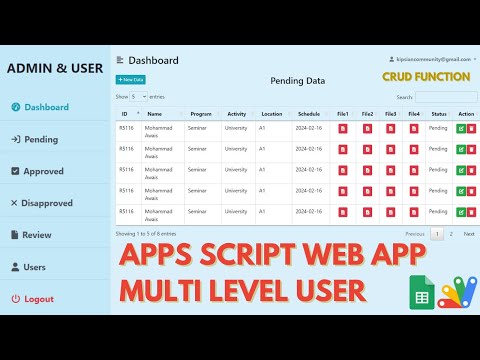
R47 was built for calling candidates to interview, and that shows in every decision it makes. Applicants arrive as Pending, each one carrying the CV they submitted, and you work down the list approving or declining while the counts at the top of the page keep score.
Total entries, pending, approved, declined โ all counted from the sheet rather than typed anywhere. Change a record from pending to approved and the approved figure moves immediately. For a queue you are working through in one sitting, that running tally is the only progress indicator anyone needs.
The entry form takes the ID, phone, name, organisation, gender, address, email and a file upload, with the status set to Pending automatically. The uploaded CV goes into a Drive folder, and each row links to it, so reviewing an applicant does not mean going hunting through Drive for a filename.
This is the behaviour worth knowing before you use it in anger. Deleting a record does not just remove the row โ it removes that person's uploaded file from the storage folder too, and tells you it has. There is a confirmation step first, but no undo afterwards. It keeps the folder from filling with orphaned documents, which is the right trade for a recruitment list and the wrong one if you needed to keep the CV.
The Drive folder has to exist before the first upload or you get a folder not found error โ create it, or change the folder name in the code to one you already use. Records missing an email are flagged on screen rather than passing silently. This is version one: a later version adds a password on the edit, delete and view-file buttons.
| Version | v1.0 |
| Published | Aug 22, 2025 |
| Platform | Google Apps Script |
| Database | Google Sheets |
| Category | Project & Task Management |
| Tags | |
| Video | Watch walkthrough |
| License | Regular License |
Subscribe on YouTube, then verify with one click. No payment, no card. Google is used only to confirm your subscription.
What you get
Not subscribed yet? Subscribe to our channel
Extra modules, your branding, integrations or reports built on top of this file. You get a clear quote and timeline before any work starts, and support after delivery.
What We Customize
20-30% advance to start โข Clear quote before work begins โข Support included after delivery
Paid picks from the same category
How to Build a AI Helpdesk Ticketing System with Google Sheets & Apps Script | E33
589 views this month
Multi Level Admin & User Web App Dashboard | Approval System | CRUD WEB APP | B7
38 views this month
Employee Task Management System with Login Using Google sheet and Appscript | B30
483 views this month
What buyers and viewers say about CRUD WEB APP USING GOOGLE APPS SCRIPT WITH APPROVAL SYSTEM V1 | R47.