Important Notice: Your success matters to us. If anything goes wrong after purchase, contact us on WhatsApp and we'll personally get it fixed.

How to Build Task Management Dashboard with Login & Logout Using Google Sheets & Apps Script | C28

C28 Project & Task Management Weekly Plan Premium Plan VIP Premium Plan
❤️
Need a Custom Business Solution?
Connect with us on WhatsApp to discuss your requirements. Our team will design and develop a tailored software solution aligned with your business workflow, operational needs, and growth objectives.
How to Build Task Management Dashboard with Login & Logout Using Google Sheets & Apps Script | C28

Key Features

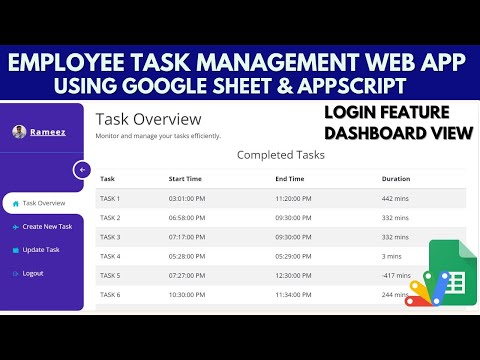
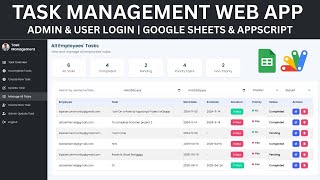
Login and logout from a Login sheet Each employee sees only their own tasks Task overview dashboard per employee Completed tasks with start date and end date Total days taken shown for every completed task Incomplete task list with days elapsed so far Create a task with a name and start date Update screen listing only your open tasks Mark a task as completed with an end date Duration calculated automatically in days Unlimited employees added as login rows All tasks stored in Google Sheets

Description

A task tracker built around one number: how long the work actually took. Employees sign in, log what they are working on, and close it when it is done — and the dashboard reports the duration in days rather than leaving everyone to guess.

Everyone's own board

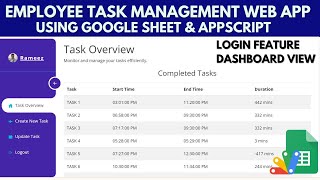
A login gives an employee their own task overview and nothing else. Completed tasks are listed with the date they started, the date they ended and the total days taken; open tasks are listed with the days that have already gone by, so a task sitting at sixty-one days is impossible to overlook. Nobody browses anybody else's board.

Two simple actions

Creating a task takes a name and a start date. Closing one is done from an update screen whose dropdown contains only that employee's still-open tasks, so there is nothing to search and no way to accidentally close someone else's work. Add the end date, mark it completed, and the duration is worked out for you — including zero days when something was started and finished the same day.

Scaling it

Employees are rows in the Login sheet, so adding a person is one line. Everything lives in Google Sheets, which means the manager who wants the raw numbers has them in a spreadsheet already.

Requirements

  • A Google account (Gmail or Google Workspace)
  • Google Sheets and Google Apps Script — no hosting or server needed
  • A Login sheet with employee usernames and passwords
  • A modern browser (Chrome, Edge, Firefox or Safari)

What's Included

  • Complete Google Apps Script source code
  • Task dashboard front-end with create and update screens
  • Google Sheets structure for logins and tasks
  • Step-by-step video walkthrough of the build
  • Free support from the developer

Item Details

Versionv1.0
PublishedAug 22, 2025
PlatformGoogle Apps Script
DatabaseGoogle Sheets
CategoryProject & Task Management
Tagstask management apptask management softwaretask managementproject managementemployee task trackertask managergoogle sheets dashboardgoogle apps script web app
VideoWatch walkthrough
LicenseRegular License

How to Build Task Management Dashboard with Login & Logout Using Google Sheets & Apps Script | C28

Project & Task Management

What You Get

Code.gs FilesComplete Apps Script source code files
HTML FilesAll HTML template files included
Google SheetYour own copy with all data and scripts
Setup GuideStep-by-step video tutorials included
6 Months SupportBug fixes, tweaks, and guidance — all free
Free UpdatesAll future updates included at no extra cost
Regular License C28
Subtotal $6.00 USD
Total $6.00 USD
Other payment methods
Wise / Bank Transfer · via WhatsApp +92 343 534 7417 $6.00
RE
Redotpay
How to Build Task Management Dashboard with Login & Logout Using Google Sheets & Apps Script | C28
Secure checkout
Amount due
$6.00
Total due
Redotpay Account
1002896884
Order summary
ItemHow to Build Task Management Dashboard with Login & Logout Using Google Sheets & Apps Script | C28
ReferenceC28
Payment MethodRedotpay
Total$6.00
How to pay
  1. Copy the Redotpay account
  2. Pay $6.00 via Redotpay
  3. Enter the transaction reference below
  4. Submit the details below to complete your order
Payments are confirmed typically within 2 business hours (Monday to Saturday). You will receive an email once access is enabled.
Your receipt and download link will be sent to this address.
Country code is set from your location. Change it if needed and enter the number without the code.
Upload a screenshot of the paymentDrop it here or click to browse · JPG or PNG, up to 2 MB
Confirmed typically within 2 business hours (Monday to Saturday)
Encrypted connection
Confirmation in 2 business hours
Emailed receipt
BP
Binance Pay
How to Build Task Management Dashboard with Login & Logout Using Google Sheets & Apps Script | C28
Secure checkout
Amount due
$6.00
Total due · no additional fees
Binance Pay ID
766412546
Account holder: Muahmmad Ramiz Imdad
Order summary
ItemHow to Build Task Management Dashboard with Login & Logout Using Google Sheets & Apps Script | C28
ReferenceC28
Payment MethodBinance Pay
Total$6.00
How to pay
  1. Open the Binance app and choose Pay
  2. Enter the Pay ID
  3. Send $6.00 in any supported asset
  4. Copy the Order ID from your Binance receipt
  5. Enter it below with a screenshot and submit
Payments are confirmed typically within 2 business hours (Monday to Saturday). You will receive an email once access is enabled.
Your receipt and download link will be sent to this address.
Country code is set from your location. Change it if needed and enter the number without the code.
Upload a screenshot of the paymentDrop it here or click to browse · JPG or PNG, up to 2 MB
Confirmed typically within 2 business hours (Monday to Saturday)
Encrypted connection
Confirmation in 2 business hours
Emailed receipt
CR
Cryptocurrency
How to Build Task Management Dashboard with Login & Logout Using Google Sheets & Apps Script | C28
Secure checkout
Amount due
$6.00
Send the equivalent amount in the selected asset
Select an asset
Wallet address
15jjKnm6NgxN1Wgbfh7xdBWgbCFztHeNhE
Send only the selected asset on the selected network. Transfers made on a different network cannot be recovered.
Order summary
ItemHow to Build Task Management Dashboard with Login & Logout Using Google Sheets & Apps Script | C28
ReferenceC28
Payment MethodCryptocurrency
Total$6.00
How to pay
  1. Select an asset above
  2. Copy the wallet address and send the equivalent of $6.00
  3. Enter the transaction hash below
  4. Submit the details below to complete your order
Payments are confirmed typically within 2 business hours (Monday to Saturday). You will receive an email once access is enabled.
Your receipt and download link will be sent to this address.
Country code is set from your location. Change it if needed and enter the number without the code.
Upload a screenshot of the paymentDrop it here or click to browse · JPG or PNG, up to 2 MB
Confirmed typically within 2 business hours (Monday to Saturday)
Encrypted connection
Confirmation in 2 business hours
Emailed receipt
PA
PayPal
How to Build Task Management Dashboard with Login & Logout Using Google Sheets & Apps Script | C28
Secure checkout
Amount due
$6.00
Total due
Pay $6.00 with PayPal
Opens PayPal in a new tab. Return here with your Transaction ID to complete the submission.
Order summary
ItemHow to Build Task Management Dashboard with Login & Logout Using Google Sheets & Apps Script | C28
ReferenceC28
Payment MethodPayPal
Total$6.00
How to pay
  1. Select Pay $6.00 with PayPal; PayPal opens in a new tab
  2. Copy the Transaction ID from your PayPal receipt
  3. Enter it below with a screenshot of the payment, then submit
  4. Your payment is verified and access is enabled; the download link is also emailed to you
Payments are confirmed typically within 2 business hours (Monday to Saturday). You will receive an email once access is enabled.
Your receipt and download link will be sent to this address.
Country code is set from your location. Change it if needed and enter the number without the code.
Upload a screenshot of the paymentDrop it here or click to browse · JPG or PNG, up to 2 MB
Confirmed typically within 2 business hours (Monday to Saturday)
Encrypted connection
Confirmation in 2 business hours
Emailed receipt

Need This Customized For Your Business?

Extra modules, your branding, integrations or reports built on top of this file. You get a clear quote and timeline before any work starts, and support after delivery.

400+
Projects Delivered
89+
Countries Served

What We Customize

Features & Functions
Add new features, modify existing scripts, custom formulas & automations
API & Integrations
Connect with WhatsApp, Payment Gateways, CRM & more
Design & UI Changes
Custom branding, layout redesign, dark mode, mobile optimization
Full Custom Projects
Dashboards, billing systems, inventory, CRM — built from scratch
Get Free Quote on WhatsApp

20-30% advance to start • Clear quote before work begins • Support included after delivery

$6.00
USD · card / manual pay

People choose these

Paid picks from the same category

How to Build a AI Helpdesk Ticketing System with Google Sheets & Apps Script | E33 How to Build a AI Helpdesk Ticketing System with Google Sheets & Apps Script | E33 589 views this month Apps Script $6.00 USD Multi Level Admin & User Web App Dashboard | Approval System | CRUD WEB APP | B7 Multi Level Admin & User Web App Dashboard | Approval System | CRUD WEB APP | B7 38 views this month Apps Script $6.00 USD Employee Task Management System with Login Using Google sheet and Appscript | B30 Employee Task Management System with Login Using Google sheet and Appscript | B30 483 views this month Apps Script $6.00 USD

Reviews & Feedback

What buyers and viewers say about How to Build Task Management Dashboard with Login & Logout Using Google Sheets & Apps Script | C28.

No star ratings yet Tap a star to be the first to rate it.
2 comments from
YouTube viewers
Sort
@subeesh_zeroo via YouTube
brooo 💥💥💥💥
1 like on YouTube
@arjunshakya1396 via YouTube
Hotel management system par video banao pls