Need a customized project? We build it to your exact requirements.Contact us on WhatsApp

Staff Attendance with Lunch Break Tracking – Google Sheets

D40 Attendance Systems HR & Payroll Premium Plan Weekly Plan VIP Premium Plan
How to Make Attendance System using Google Sheets & Apps Script | Photo & Lunch Break Tracking | D40
You get
  • Google Sheet link
  • Source code file
  • Resale rights
  • Edit rights
  • Setup guide
  • AI setup help

Key Features

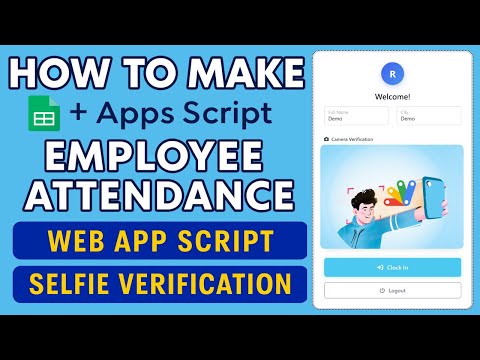
Clock in and clock out with exact timestamps Lunch break start and end tracking Selfie photo capture at punch time for verification Photos uploaded automatically to Google Drive GPS location captured on every punch IP address logged against each entry Login history with employee validation Monthly summary of present absent and remaining days Employee cannot punch twice for the same slot Google Sheets as the only database - no external server

Description

A staff attendance system with proof attached to every punch. Employees clock in from their phone and the app records the time, a selfie, the GPS coordinates and the IP address — so attendance is a verified record, not a claim.

Four signals on every punch

  • Timestamp — exact clock-in and clock-out time
  • Selfie — camera capture at punch time, uploaded automatically to Google Drive
  • GPS location — where the punch actually happened
  • IP address — logged against the entry

Together these close the two loopholes that make honour-system attendance useless: someone else clocking you in, and clocking in from somewhere other than work.

Lunch breaks counted properly

Break start and break end are tracked as their own events rather than being folded into the working day. That gives an honest picture of hours actually worked — which matters when attendance feeds into payroll, and matters more when staff are paid hourly.

The monthly view

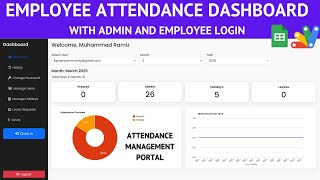
Every entry rolls up into a monthly summary per employee showing days present, days absent and days remaining in the period. Login history with employee validation sits alongside it, so an unrecognised attempt is visible rather than silently accepted. The app also blocks a second punch for a slot already filled, which stops the most common accidental double entry.

Who it suits

Offices without biometric hardware, field and site teams where GPS is the point, retail and restaurant shifts with real break tracking, and any business that wants a verifiable attendance trail without buying a device per location.

Setup

Copy the sheet, deploy the script, share the web app link with staff. Google Sheets holds the attendance data and Google Drive holds the photos — no external server and no hardware. The video covers the full build, and support is free if you get stuck.

Requirements

  • Google account with access to Google Sheets and Drive
  • Apps Script editor - built into Google Sheets
  • Google Drive space for the selfie photo uploads
  • Device with a camera - phone or laptop webcam
  • Browser location permission allowed for GPS capture
  • HTTPS web app URL - required by browsers for camera and location access

What's Included

  • Complete Google Apps Script source code
  • Attendance web app front end with camera capture
  • Google Sheet with Attendance, Employees and Login History tabs
  • Google Drive photo upload script
  • Monthly attendance summary report
  • Demo employee records
  • Full video walkthrough
  • Free support by WhatsApp and email

Item Details

Versionv1.0
PublishedSep 4, 2025
PlatformGoogle Apps Script
DatabaseGoogle Sheets
CategoryAttendance Systems, HR & Payroll
Tagstime in time out google sheetsclock in clock out google sheetsemployee attendance google sheetsattendance system google apps scriptlunch break trackingselfie attendance systemgps attendance tracking systemattendance system for employees
VideoWatch walkthrough
LicenseRegular License
Regular License D40
Subtotal $1.55 USD
Total $1.55 USD
Other payment methods
Wise / Bank Transfer · via WhatsApp +92 343 534 7417 $3.10$1.55
Redotpay
How to Make Attendance System using Google Sheets & Apps Script | Photo & Lunch Break Tracking | D40
Secure checkout
Amount due
$1.55$3.10
Total due
Redotpay Account
1002896884
How to pay
  1. Copy the Redotpay account
  2. Pay $1.55 via Redotpay
  3. Enter the transaction reference below
  4. Submit the details below to complete your order
Order details$1.55
Order summary
ItemHow to Make Attendance System using Google Sheets & Apps Script | Photo & Lunch Break Tracking | D40
ReferenceD40
Payment MethodRedotpay
Total$1.55
Your payment proofReference + screenshot — takes a minute
Your receipt and download link will be sent to this address.
Country code is set from your location. Change it if needed and enter the number without the code.
Upload a screenshot of the paymentDrop it here or click to browse · JPG or PNG, up to 2 MB
Confirmed typically within 2 hours (24/7)
Encrypted connection
Confirmation in 2 hours
Emailed receipt
Binance Pay
How to Make Attendance System using Google Sheets & Apps Script | Photo & Lunch Break Tracking | D40
Secure checkout
Amount due
$1.55
Total due · no additional fees
Binance Pay ID
766412546
Account holder: Muahmmad Ramiz Imdad
How to pay
  1. Open the Binance app and choose Pay
  2. Enter the Pay ID
  3. Send $1.55 in any supported asset
  4. Copy the Order ID from your Binance receipt
  5. Enter it below with a screenshot and submit
Order details$1.55
Order summary
ItemHow to Make Attendance System using Google Sheets & Apps Script | Photo & Lunch Break Tracking | D40
ReferenceD40
Payment MethodBinance Pay
Total$1.55
Your payment proofReference + screenshot — takes a minute
Your receipt and download link will be sent to this address.
Country code is set from your location. Change it if needed and enter the number without the code.
Upload a screenshot of the paymentDrop it here or click to browse · JPG or PNG, up to 2 MB
Confirmed typically within 2 hours (24/7)
Encrypted connection
Confirmation in 2 hours
Emailed receipt
Cryptocurrency
How to Make Attendance System using Google Sheets & Apps Script | Photo & Lunch Break Tracking | D40
Secure checkout
Amount due
$1.55
Send the equivalent amount in the selected asset
Select an asset
Wallet address
15jjKnm6NgxN1Wgbfh7xdBWgbCFztHeNhE
Send only the selected asset on the selected network. Transfers made on a different network cannot be recovered.
How to pay
  1. Select an asset above
  2. Copy the wallet address and send the equivalent of $1.55
  3. Enter the transaction hash below
  4. Submit the details below to complete your order
Order details$1.55
Order summary
ItemHow to Make Attendance System using Google Sheets & Apps Script | Photo & Lunch Break Tracking | D40
ReferenceD40
Payment MethodCryptocurrency
Total$1.55
Your payment proofReference + screenshot — takes a minute
Your receipt and download link will be sent to this address.
Country code is set from your location. Change it if needed and enter the number without the code.
Upload a screenshot of the paymentDrop it here or click to browse · JPG or PNG, up to 2 MB
Confirmed typically within 2 hours (24/7)
Encrypted connection
Confirmation in 2 hours
Emailed receipt
PayPal
How to Make Attendance System using Google Sheets & Apps Script | Photo & Lunch Break Tracking | D40
Secure checkout
Amount due
$1.55
Total due
Pay $1.55 with PayPal
Opens PayPal in a new tab. Return here with your Transaction ID to complete the submission.
How to pay
  1. Select Pay $1.55 with PayPal; PayPal opens in a new tab
  2. Copy the Transaction ID from your PayPal receipt
  3. Enter it below with a screenshot of the payment, then submit
  4. Your payment is verified and access is enabled; the download link is also emailed to you
Order details$1.55
Order summary
ItemHow to Make Attendance System using Google Sheets & Apps Script | Photo & Lunch Break Tracking | D40
ReferenceD40
Payment MethodPayPal
Total$1.55
Your payment proofReference + screenshot — takes a minute
Your receipt and download link will be sent to this address.
Country code is set from your location. Change it if needed and enter the number without the code.
Upload a screenshot of the paymentDrop it here or click to browse · JPG or PNG, up to 2 MB
Confirmed typically within 2 hours (24/7)
Encrypted connection
Confirmation in 2 hours
Emailed receipt

Need This Customized For Your Business?

Extra modules, your branding, integrations or reports built on top of this file. You get a clear quote and timeline before any work starts, and support after delivery.

400+
Projects Delivered
91+
Countries Served

What We Customize

Features & Functions
Add new features, modify existing scripts, custom formulas & automations
API & Integrations
Connect with WhatsApp, Payment Gateways, CRM & more
Design & UI Changes
Custom branding, layout redesign, dark mode, mobile optimization
Full Custom Projects
Dashboards, billing systems, inventory, CRM — built from scratch
Get Free Quote on WhatsApp

20-30% advance to start • Clear quote before work begins • Support included after delivery

$1.55
USD · card / manual pay

People choose these

What buyers of this file added to the same order

How to Make Google Apps Script Attendance System Clock In/Out with IP & Selfie | D39 How to Make Google Apps Script Attendance System Clock In/Out with IP & Selfie | D39 Bought with this one Apps Script $1.16 USD How I Built NFC Attendance System with Claude AI | PHP MySQL + NFC Tags + Full Source Code How I Built NFC Attendance System with Claude AI | PHP MySQL + NFC Tags + Full Source Code 747 views this month PHP $3.91 USD Employee Attendance Management System Using AppScript | Admin & Employee Portal | C38 Employee Attendance Management System Using AppScript | Admin & Employee Portal | C38 113 views this month Apps Script $1.29 USD

Reviews & Feedback

What buyers and viewers say about How to Make Attendance System using Google Sheets & Apps Script | Photo & Lunch Break Tracking | D40.

No star ratings yet Tap a star to be the first to rate it.
22 comments from
YouTube viewers
Sort
@mitcomputernepal via YouTube
Verry Verry so nice but if have admistrator login and print all employee today, monthly and yearly printing options thats wow wonderful please sir make next part for this opsins
@artwellhachunde6417 via YouTube
This is excellent
@computersecret via YouTube
Verry Nice Sir
@LearnKidsZone via YouTube
Informative ❤
@tebss-support via YouTube
Simple but wonderful
@sofyanmutta4567 via YouTube
Very very awesome
@Nolly_African_Tales via YouTube
It’s exactly what companies need
@Nolly_African_Tales via YouTube
This is a simple but very important mode 🎉❤
@souratech5767 via YouTube
very interesting💯
@irfanchauhan495 via YouTube
Super Web Application 🎉
@AsaKhatun-mr7pu via YouTube
Very helpfully
@AsaKhatun-mr7pu via YouTube
Wonderful & helpfully 🎉
@rafikulislam6512 via YouTube
'Wonderful 🎉
@rafikulislam6512 via YouTube
Very helpfully 🎉
@rafikulislam6512 via YouTube
Very nice project 🎉
@MichaelS.Glasgow via YouTube
Fantastic Web App ✅
@IshfaqAhmadBhat-p8m via YouTube
Highly appreciated
@BinodNepali-g6c via YouTube
Nice work! Adding leave and export options would make it even better 👍
@solimanalali8048 via YouTube
thank you bro
@rasc-c5e via YouTube
Very Nice 👍
@jordanfelipe31 via YouTube
Very good 👍🏿
@EmmanuelBaudiot via YouTube
Beau travail !