




Need a customized project? We build it to your exact requirements.Contact us on WhatsApp

Free POS & Inventory with Stock Alerts – Google Sheets

P1 Inventory & Warehouse POS & Retail Premium Plan Weekly Plan VIP Premium Plan
❤️
Need a Custom Business Solution?
Connect with us on WhatsApp to discuss your requirements. Our team will design and develop a tailored software solution aligned with your business workflow, operational needs, and growth objectives.
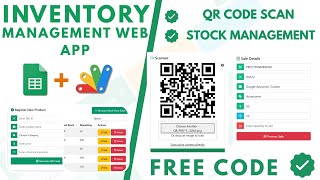
Inventory &  Store (POS) Web App using Google Sheets and Apps Script | P1
You get
  • Google Sheet link
  • Source code file
  • Resale rights
  • Edit rights
  • Setup guide
  • AI setup help

Key Features

Colour-coded stock levels from healthy to critical Configurable reorder thresholds Purchase entry with per-item cost calculated automatically Sale entry with price discount and tax Sales tax percentage set per country Invoice emailed to the customer automatically on sale Insufficient-stock error blocking an oversell Stock balance updated after every transaction Customer report with full purchase history Search a customer by ID or name Colour-coded payment status and discount columns Payment method colour coding for cash card loan and bank Edit any record by its ID Dashboard with total income profit purchases and tax Google Sheets as the database

Description

A store system built around one habit: you should be able to glance at the stock list and know what to reorder without reading a single number. Colour does the work, and everything else — the sale, the tax, the invoice, the customer history — follows from it.

Stock you read at a glance

Every product's quantity is colour-coded against thresholds you set: healthy stock in green, a level that needs reordering in orange, and critically low in red. The value of it is that nobody has to sort or filter to find the problem — the orange rows are the shopping list.

Selling, with the tax right

Purchases record the quantity and the amount spent, and the per-item cost is worked out from them. Sales carry the selling price, a discount and a sales tax percentage you enter yourself rather than one hard-coded at 18% or 2.5% — the same build works for GST in India, sales tax in Pakistan, VAT elsewhere. Try to sell six of something you have five of and the system refuses with an insufficient-stock message instead of quietly writing a negative balance. Stock updates immediately after each transaction.

The customer's invoice, sent for you

When a sale is recorded, the invoice emails to that customer's address automatically. No attaching, no forwarding, no "can you send me the bill again".

Customer history and the numbers

Search a customer by ID or name and their whole history comes up, colour-coded across the columns that matter: unpaid amounts in red, settled in green, discounts and unpaid tax marked, and each payment method in its own colour — cash, card, bank or loan. Records are editable by ID. On top, a dashboard calculating total income, profit, purchases, salary and tax from the same data.

Requirements

  • A Google account (Gmail or Google Workspace)
  • Google Sheets and Google Apps Script — no hosting or server needed
  • Your product list with opening quantities and prices
  • Your own sales tax or GST rate and reorder thresholds
  • Customer email addresses for automatic invoice delivery

What's Included

  • Complete Google Apps Script source code
  • Inventory list with colour-coded stock levels
  • Purchase and sale entry with automatic cost calculation
  • Configurable sales tax or GST percentage
  • Automatic invoice email to the customer
  • Insufficient-stock protection on every sale
  • Customer report with searchable purchase history
  • Colour-coded payment status and method
  • Dashboard for income, profit, purchases and tax
  • Google Sheets structure for products, sales and customers
  • Step-by-step video walkthrough of the full build
  • Free support from the developer

Item Details

Versionv1.0
PublishedAug 22, 2025
PlatformGoogle Apps Script
DatabaseGoogle Sheets
CategoryInventory & Warehouse, POS & Retail
Tagspos system using google sheetspos system google sheets templateinventory management system google sheetspos system for small business freestore management system google sheetsstock management system google sheetspos system google apps scriptlow stock alert google sheets
VideoWatch walkthrough
LicenseRegular License
Subscription Verification Required
This is a free file. Subscribe to our YouTube channel to unlock the source code + Google Sheet. One click — no payment. Google only confirms you are subscribed.
Verify Now
Free download

Subscribe & Unlock Source Code

Subscribe on YouTube, then verify with one click. No payment, no card. Google is used only to confirm your subscription.

What you get

  • Code.gs + HTML filesThe complete Apps Script project
  • Google SheetYour own copy with the data
  • Setup guideInstall steps from start to finish

Not subscribed yet? Subscribe to our channel

Browse More Free Files

Need This Customized For Your Business?

Extra modules, your branding, integrations or reports built on top of this file. You get a clear quote and timeline before any work starts, and support after delivery.

400+
Projects Delivered
91+
Countries Served

What We Customize

Features & Functions
Add new features, modify existing scripts, custom formulas & automations
API & Integrations
Connect with WhatsApp, Payment Gateways, CRM & more
Design & UI Changes
Custom branding, layout redesign, dark mode, mobile optimization
Full Custom Projects
Dashboards, billing systems, inventory, CRM — built from scratch
Get Free Quote on WhatsApp

20-30% advance to start • Clear quote before work begins • Support included after delivery

Free
Source Code File

People choose these

Paid picks from the same category

Grocery Store POS System with Barcode Scanner | Google Sheet POS + Apps Script + AI Grocery Store POS System with Barcode Scanner | Google Sheet POS + Apps Script + AI 242 views this month Apps Script How to Build an App with Claude AI: Complete Church Management System in Google Sheets How to Build an App with Claude AI: Complete Church Management System in Google Sheets 161 views this month Apps Script Manage Your Installments Like a Pro: Complete Web App Demo Manage Your Installments Like a Pro: Complete Web App Demo 205 views this month PHP

Reviews & Feedback

What buyers and viewers say about Inventory & Store (POS) Web App using Google Sheets and Apps Script | P1.

No star ratings yet Tap a star to be the first to rate it.
3 comments from
YouTube viewers
Sort
@daoodali6922 via YouTube
It's free❤...?
@krishnanmanoj1 via YouTube
Super POS🎉😊
@zohairdilawar116 via YouTube
Nice work thankyou