



Need a customized project? We build it to your exact requirements.Contact us on WhatsApp

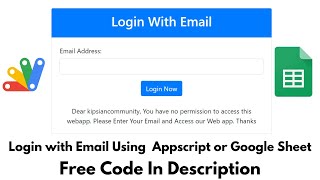
Login with Forgot Password Email OTP – Google Apps Script

B9 Login & Authentication Automation & Integration Weekly Plan Premium Plan VIP Premium Plan
How To Make Login System In Appscript With Forgot / Reset Password Using Email OTP Verification | B9
You get
  • Google Sheet link
  • Source code file
  • Resale rights
  • Edit rights
  • Setup guide
  • AI setup help

Key Features

Forgot password flow with email verification Six digit OTP sent to the registered address Email checked against the sheet before any OTP goes out Clear message when an email is not in the database Invalid email caught before the request is sent Confirmation step before the reset begins Password rule of eight characters with mixed case number and symbol Confirmation email after the password is changed Login blocked when the admin marks a user disapproved Blocked attempts written to an activity sheet with date and time Destination page opened without showing its address Animated login form styling Approve or block a user by editing one cell

Description

B9 is the login page with the part most Apps Script logins leave out — a working forgot password. Not a note telling people to email the admin, but a proper flow: prove you own the address, receive a one-time code, and set a new password that has to be a real one.

The reset flow, step by step

Pressing Reset asks for confirmation first, so nobody starts the process by misclick. Then you enter your email. If that address is not in the sheet, the app says so plainly and stops — no code is sent to an address that has no account, and a blank or malformed entry is rejected before the request goes anywhere. When the email does match, a six digit OTP is mailed to it and the password fields stay locked until that code is entered correctly.

A password rule that means something

The new password must be at least eight characters and mix upper case, lower case, a number and a special character. The rule is stated on screen and enforced, so people cannot quietly reset to something shorter than what they had. Once it is saved, a confirmation email goes out telling the account holder their password was changed — which is how somebody finds out if a reset was not them.

Blocking a user without deleting them

Every account carries an approval state. Set it to disapproved and that person is told they are blocked by the admin instead of being let in, and the attempt is written to an activity sheet with the account, the date and the time. Approve them again and they are back. One cell governs access, and the record of the attempts survives either way.

After login

A successful login opens the page you nominate, loaded without its address being exposed on screen, so the destination link is not handed out to whoever gets through the form.

Requirements

  • A Google account with Drive and Sheets
  • Your own copy of the provided spreadsheet
  • Authorise the script so it can send the OTP email
  • A destination page for users to land on after login
  • Deploy as a web app with access set to anyone

What's Included

  • Complete Apps Script code for the login and reset flow
  • Google Sheet with the user and activity tabs
  • Animated login form
  • Forgot password flow with email verification
  • Six digit OTP email and verification step
  • Password strength rule with on screen guidance
  • Confirmation email after a password change
  • Admin approve and block state per user
  • Activity log of blocked login attempts
  • Hidden redirect to your chosen page
  • Step-by-step video walkthrough of the full build
  • Free support from the developer

Item Details

Versionv1.0
PublishedAug 22, 2025
PlatformGoogle Apps Script
DatabaseGoogle Sheets
CategoryLogin & Authentication, Automation & Integration
Tagsforgot password email otp apps scriptlogin system google apps scriptreset password email otp google sheetsemail otp verification codeotp based login systemgoogle sheets login pagepassword strength validation apps scriptblock user from login google sheets
VideoWatch walkthrough
LicenseRegular License
Regular License B9
Subtotal $9.99 USD
Total $9.99 USD
Other payment methods
Wise / Bank Transfer · via WhatsApp +92 343 534 7417 $19.98$9.99
Redotpay
How To Make Login System In Appscript With Forgot / Reset Password Using Email OTP Verification | B9
Secure checkout
Amount due
$9.99$19.98
Total due
Redotpay Account
1002896884
How to pay
  1. Copy the Redotpay account
  2. Pay $9.99 via Redotpay
  3. Enter the transaction reference below
  4. Submit the details below to complete your order
Order details$9.99
Order summary
ItemHow To Make Login System In Appscript With Forgot / Reset Password Using Email OTP Verification | B9
ReferenceB9
Payment MethodRedotpay
Total$9.99
Your payment proofReference + screenshot — takes a minute
Your receipt and download link will be sent to this address.
Country code is set from your location. Change it if needed and enter the number without the code.
Upload a screenshot of the paymentDrop it here or click to browse · JPG or PNG, up to 2 MB
Confirmed typically within 2 hours (24/7)
Encrypted connection
Confirmation in 2 hours
Emailed receipt
Get a custom version for your business

Your features, branding and reports, built on this system. Free quote before any work starts.

Chat on WhatsApp
Binance Pay
How To Make Login System In Appscript With Forgot / Reset Password Using Email OTP Verification | B9
Secure checkout
Amount due
$9.99
Total due · no additional fees
Binance Pay ID
766412546
Account holder: Muahmmad Ramiz Imdad
How to pay
  1. Open the Binance app and choose Pay
  2. Enter the Pay ID
  3. Send $9.99 in any supported asset
  4. Copy the Order ID from your Binance receipt
  5. Enter it below with a screenshot and submit
Order details$9.99
Order summary
ItemHow To Make Login System In Appscript With Forgot / Reset Password Using Email OTP Verification | B9
ReferenceB9
Payment MethodBinance Pay
Total$9.99
Your payment proofReference + screenshot — takes a minute
Your receipt and download link will be sent to this address.
Country code is set from your location. Change it if needed and enter the number without the code.
Upload a screenshot of the paymentDrop it here or click to browse · JPG or PNG, up to 2 MB
Confirmed typically within 2 hours (24/7)
Encrypted connection
Confirmation in 2 hours
Emailed receipt
Cryptocurrency
How To Make Login System In Appscript With Forgot / Reset Password Using Email OTP Verification | B9
Secure checkout
Amount due
$9.99
Send the equivalent amount in the selected asset
Select an asset
Wallet address
15jjKnm6NgxN1Wgbfh7xdBWgbCFztHeNhE
Send only the selected asset on the selected network. Transfers made on a different network cannot be recovered.
How to pay
  1. Select an asset above
  2. Copy the wallet address and send the equivalent of $9.99
  3. Enter the transaction hash below
  4. Submit the details below to complete your order
Order details$9.99
Order summary
ItemHow To Make Login System In Appscript With Forgot / Reset Password Using Email OTP Verification | B9
ReferenceB9
Payment MethodCryptocurrency
Total$9.99
Your payment proofReference + screenshot — takes a minute
Your receipt and download link will be sent to this address.
Country code is set from your location. Change it if needed and enter the number without the code.
Upload a screenshot of the paymentDrop it here or click to browse · JPG or PNG, up to 2 MB
Confirmed typically within 2 hours (24/7)
Encrypted connection
Confirmation in 2 hours
Emailed receipt
PayPal
How To Make Login System In Appscript With Forgot / Reset Password Using Email OTP Verification | B9
Secure checkout
Amount due
$9.99
Total due
Pay $9.99 with PayPal
Opens PayPal in a new tab. Return here with your Transaction ID to complete the submission.
How to pay
  1. Select Pay $9.99 with PayPal; PayPal opens in a new tab
  2. Copy the Transaction ID from your PayPal receipt
  3. Enter it below with a screenshot of the payment, then submit
  4. Your payment is verified and access is enabled; the download link is also emailed to you
Order details$9.99
Order summary
ItemHow To Make Login System In Appscript With Forgot / Reset Password Using Email OTP Verification | B9
ReferenceB9
Payment MethodPayPal
Total$9.99
Your payment proofReference + screenshot — takes a minute
Your receipt and download link will be sent to this address.
Country code is set from your location. Change it if needed and enter the number without the code.
Upload a screenshot of the paymentDrop it here or click to browse · JPG or PNG, up to 2 MB
Confirmed typically within 2 hours (24/7)
Encrypted connection
Confirmation in 2 hours
Emailed receipt
Custom development

Need this customized for your business?

Extra modules, your branding, integrations or reports built on top of this file. You get a clear quote and timeline before any work starts, and support after delivery.

400+Projects delivered
91+Countries served

20–30% advance to start · Clear quote before work begins · Support after delivery

What we customize

  • Features & functionsNew features, changes to existing scripts, custom formulas and automations
  • API & integrationsWhatsApp, payment gateways, CRM and more
  • Design & UI changesYour branding, layout redesign, dark mode, mobile layout
  • Full custom projectsDashboards, billing, inventory, CRM, built from scratch
$9.99
USD · card / manual pay

People choose these

Paid picks from the same category

Grocery Store POS System with Barcode Scanner | Google Sheet POS + Apps Script + AI Grocery Store POS System with Barcode Scanner | Google Sheet POS + Apps Script + AI 381 views this month Apps Script $9.99 USD How to Build an App with Claude AI: Complete Church Management System in Google Sheets How to Build an App with Claude AI: Complete Church Management System in Google Sheets 187 views this month Apps Script $9.99 USD Manage Your Installments Like a Pro: Complete Web App Demo Manage Your Installments Like a Pro: Complete Web App Demo 216 views this month PHP $9.99 USD

Reviews & Feedback

What buyers and YouTube viewers say about this project.

Sort
@rafikulislam6512 via YouTube
I'am from Bangladesh. Excellent Web apps dear sir. I am very happy to your video. it is very helpful my work. Go ahead with new projects. I am with you. thanks a lot. ❤❤❤❤❤❤❤❤❤
@MuhammadHafeezHafeez-my4cq via YouTube
Google sheet ka link kidar hai. Google sheet kesay copy kry
@talkwithtech07 via YouTube
That's Great 👍🏻 Bro Try to Create A Tutorial for subscriber Email Newsletter For Free
@GMPMUSIC-d6r via YouTube
I am ajay guru jee keise hai


