


Need a customized project? We build it to your exact requirements.Contact us on WhatsApp

Free Stock Management System – Google Sheets Apps Script

B1 Inventory & Warehouse Premium Plan Weekly Plan VIP Premium Plan
❤️
Need a Custom Business Solution?
Connect with us on WhatsApp to discuss your requirements. Our team will design and develop a tailored software solution aligned with your business workflow, operational needs, and growth objectives.
Stock Management System Web APP Using Google Sheet and Apps Sctipt | B1
You get
  • Google Sheet link
  • Source code file
  • Resale rights
  • Edit rights
  • Setup guide
  • AI setup help

Key Features

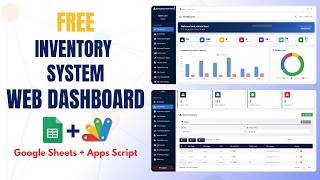
Dashboard with total items purchases and consumption Live current stock per individual item Stock derived from purchases minus consumption Add Item form for new products Autocomplete product dropdown on every form Dynamic purchase form with unlimited lines Dynamic consumption form with unlimited lines Lines removable before submitting A product already chosen cannot be picked twice in one entry Remarks or brand recorded per entry Email notification on every submission Report of all entries with a count Filter by purchase consumption or both Search by product type and across all columns Date range filter on the report Excel PDF print and copy export Login-protected admin dashboard Google Sheets as the database

Description

Stock as a running balance, not a number somebody types. Every purchase adds, every consumption subtracts, and what remains is calculated — so the figure on the dashboard is always the arithmetic of what actually happened.

Two movements, one truth

Stock only changes two ways here: you buy it in, or you use and sell it out. Both are recorded on their own form, and the current stock of every item is purchases minus consumption. Nobody edits a stock figure directly, which is what stops the count drifting away from reality the way a hand-maintained inventory sheet always does.

Forms built for a real entry session

Both forms are dynamic — add as many lines as the delivery or the day's usage has, and remove a line you added by mistake. The product field autocompletes against what already exists, so nobody invents a second spelling of the same item. And a product already chosen in that entry cannot be selected again, which prevents the double-count that happens when someone loses their place halfway down a long list.

Reporting on it

The report shows every movement with a count, filtered to purchases only, consumption only, or both — each with its own total. There is a search on the product type and a second search across every column, plus a date range filter for reviewing a week, a month or a delivery period. Export to Excel or PDF, print, or copy.

And it tells you

Every submission sends an email notification, so stock movements reach you without anyone opening the app — useful when the person entering and the person responsible are not the same.

Requirements

  • A Google account (Gmail or Google Workspace)
  • Google Sheets and Google Apps Script — no hosting or server needed
  • Your product list with opening quantities
  • Gmail for the submission notification emails
  • A login sheet for the admin dashboard

What's Included

  • Complete Google Apps Script source code
  • Dashboard with items, purchases, consumption and live stock
  • Add Item form for new products
  • Dynamic purchase and consumption forms with autocomplete
  • Duplicate-line protection within one entry
  • Email notification on every submission
  • Report with type filters, dual search and date range
  • Excel, PDF, print and copy export
  • Login-protected admin dashboard
  • Google Sheets structure for products and movements
  • Step-by-step video walkthrough of the full build
  • Free support from the developer

Item Details

Versionv1.0
PublishedAug 22, 2025
PlatformGoogle Apps Script
DatabaseGoogle Sheets
CategoryInventory & Warehouse
Tagsstock management system google sheetsstock management systemstock inventory management system with google sheetsinventory management system google sheetsstock management system google apps scriptpurchase and consumption trackingmaterial consumption trackerstock register web app
VideoWatch walkthrough
LicenseRegular License
Subscription Verification Required
This is a free file. Subscribe to our YouTube channel to unlock the source code + Google Sheet. One click — no payment. Google only confirms you are subscribed.
Verify Now
Free download

Subscribe & Unlock Source Code

Subscribe on YouTube, then verify with one click. No payment, no card. Google is used only to confirm your subscription.

What you get

  • Code.gs + HTML filesThe complete Apps Script project
  • Google SheetYour own copy with the data
  • Setup guideInstall steps from start to finish

Not subscribed yet? Subscribe to our channel

Browse More Free Files

Need This Customized For Your Business?

Extra modules, your branding, integrations or reports built on top of this file. You get a clear quote and timeline before any work starts, and support after delivery.

400+
Projects Delivered
91+
Countries Served

What We Customize

Features & Functions
Add new features, modify existing scripts, custom formulas & automations
API & Integrations
Connect with WhatsApp, Payment Gateways, CRM & more
Design & UI Changes
Custom branding, layout redesign, dark mode, mobile optimization
Full Custom Projects
Dashboards, billing systems, inventory, CRM — built from scratch
Get Free Quote on WhatsApp

20-30% advance to start • Clear quote before work begins • Support included after delivery

Free
Source Code File

People choose these

Paid picks from the same category

Full-Stack Shoe Inventory System Using Google Sheets and Apps Script | E48 Full-Stack Shoe Inventory System Using Google Sheets and Apps Script | E48 50 views this month Apps Script How to Build a Mobile Inventory Dashboard with Google Apps Script | D36 How to Build a Mobile Inventory Dashboard with Google Apps Script | D36 42 views this month Apps Script Grocery Store POS System with Barcode Scanner | Google Sheet POS + Apps Script + AI Grocery Store POS System with Barcode Scanner | Google Sheet POS + Apps Script + AI 242 views this month Apps Script

Reviews & Feedback

What buyers and viewers say about Stock Management System Web APP Using Google Sheet and Apps Sctipt | B1.

No star ratings yet Tap a star to be the first to rate it.
4 comments from
YouTube viewers
Sort
@esatkurtul via YouTube
no source code this project in your blog
1 like on YouTube
@CubiloForest via YouTube
Super.......
@অচেনাঅন্ধকার via YouTube
Awesome project
@অচেনাঅন্ধকার via YouTube
You have presented your project wonderfully. Best wishes to you. May Allah bless you.