





 @GiangTienPhat
via YouTube
@GiangTienPhat
via YouTube
there is no link on "Open the web app link provided." where can i get the link? thanks...

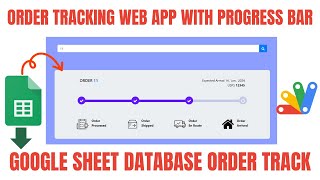
An order progress portal where the same page shows two very different things depending on who signed in. The admin sees every order in the business; a customer sees only theirs. Everything lives in Google Sheets and runs through Google Apps Script.
Log in as admin and every region's orders are open to you, with counts across the top: total orders, how many are still processing, shipped, on the road and arrived. Log in as a customer and the same screen returns only the rows carrying that username — a customer with no orders yet simply sees nothing, rather than someone else's shipments.
Orders are kept in one sheet per country or city — Pakistan Orders, Dubai Orders, India Orders — and each appears as its own tab in the portal. Opening a new market means copying a sheet and repeating one block in the script; there is no limit on how many regions you run, and the status filters and counts work the same way in each.
Both roles can search a tracking ID directly. A match opens that single order and its current status; no match says so plainly instead of returning an empty table. Clearing the search brings the full list back.
| Version | v1.0 |
| Published | Aug 22, 2025 |
| Platform | Google Apps Script |
| Database | Google Sheets |
| Category | Logistics & Delivery |
| Tags | |
| Video | Watch walkthrough |
| License | Regular License |
Subscribe on YouTube, then verify with one click. No payment, no card. Google is used only to confirm your subscription.
What you get
Not subscribed yet? Subscribe to our channel



Extra modules, your branding, integrations or reports built on top of this file. You get a clear quote and timeline before any work starts, and support after delivery.
20–30% advance to start · Clear quote before work begins · Support after delivery
What we customize
Paid picks from the same category
What buyers and YouTube viewers say about this project.
@GiangTienPhat
via YouTube
 @RobertHarp
via YouTube
@RobertHarp
via YouTube