Need a customized project? We build it to your exact requirements.Contact us on WhatsApp

Multi-Currency Banking Web App – Google Sheets Apps Script

C48 Accounting & Finance Premium Plan VIP Premium Plan
Build a Banking Web App with Google Sheets & Apps Script πŸ”₯ Multi-Currency Wallets | C48
You get
  • Google Sheet link
  • Source code file
  • Resale rights
  • Edit rights
  • Setup guide
  • AI setup help

Key Features

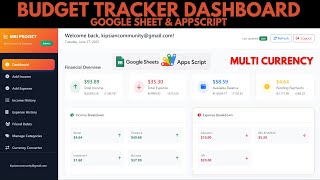
Administrator and customer roles with separate portals Multiple currency wallets per customer Admin creates a wallet with currency and opening balance Transfer funds by the recipient's email address Recipient's own wallets offered as the destination Automatic currency conversion on cross-currency transfers Conversion rates maintained in a sheet you control Any currency added by adding its rate Transaction receipt generated on every transfer Email alerts on login and on funds received New balance included in the transaction email Deposit request form with medium transaction ID and bank Admin marks a deposit received or unreceived Approved deposit credits the wallet automatically Recent transactions and full transaction history Self signup with a default wallet created on the spot Admin account creation with a deposit limit Editable how-to-deposit steps shown to customers App name and default currency set in Settings Change password from the profile screen

Description

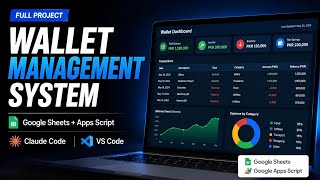
A digital wallet and transfer system on Google Sheets, with the piece most wallet demos skip: money actually moving between currencies at a rate you control.

Wallets per currency, per customer

A customer can hold a PKR wallet, a USD wallet, an INR wallet β€” whichever you create for them, each with its own balance. The admin adds a wallet with an email address, a currency and an opening figure, and it appears on that customer's dashboard within seconds.

Transfers that convert themselves

Send funds by typing the recipient's email; their wallets appear and you choose which one the money lands in. Send USD into a PKR wallet and the conversion happens on the way, using rates held in a sheet β€” which means adding a new currency is adding its rate, not editing the app. Every transfer produces a receipt, and the recipient gets an email carrying the amount and their new balance.

Getting money in

Customers submit a deposit request with the amount, the medium they paid through, the transaction ID, the bank and the account number. It lands in the admin's Manage Requests screen to be marked received or unreceived; approving it credits the wallet and notifies the customer. The how-to-deposit steps customers read are themselves editable in a sheet, so your own payment instructions appear there.

Two sides of the app

Customers get transfers, transaction history, deposits and their profile. Admins get wallet management, deposit requests, account management and settings β€” where the application's own name and default currency are set and take effect across every screen. New customers can sign themselves up, and each new account opens with a wallet ready to use.

Requirements

  • A Google account (Gmail or Google Workspace)
  • Google Sheets and Google Apps Script β€” no hosting or server needed
  • A Gmail address to send transaction and login emails from
  • A currency sheet holding your own conversion rates
  • A modern browser (Chrome, Edge, Firefox or Safari)

What's Included

  • Complete Google Apps Script source code
  • Customer and admin portals with wallets, transfers and requests
  • Transaction receipt and email templates
  • Google Sheets structure for accounts, wallets, currencies and transactions
  • Step-by-step video walkthrough of the full build
  • Free support from the developer

Item Details

Versionv1.0
PublishedAug 22, 2025
PlatformGoogle Apps Script
DatabaseGoogle Sheets
CategoryAccounting & Finance
Tagsonline banking system google sheetsonline banking system project with source codebanking web app google apps scriptmulti currency wallet systemdigital wallet systemfund transfer systembanking web app source codecurrency conversion google sheets
VideoWatch walkthrough
LicenseRegular License
Regular License C48
Subtotal $9.99 USD
Total $9.99 USD
Other payment methods
Wise / Bank Transfer Β· via WhatsApp +92 343 534 7417 $19.98$9.99
Redotpay
Build a Banking Web App with Google Sheets & Apps Script πŸ”₯ Multi-Currency Wallets | C48
Secure checkout
Amount due
$9.99$19.98
Total due
Redotpay Account
1002896884
How to pay
  1. Copy the Redotpay account
  2. Pay $9.99 via Redotpay
  3. Enter the transaction reference below
  4. Submit the details below to complete your order
Order details$9.99
Order summary
ItemBuild a Banking Web App with Google Sheets & Apps Script πŸ”₯ Multi-Currency Wallets | C48
ReferenceC48
Payment MethodRedotpay
Total$9.99
Your payment proofReference + screenshot β€” takes a minute
Your receipt and download link will be sent to this address.
Country code is set from your location. Change it if needed and enter the number without the code.
Upload a screenshot of the paymentDrop it here or click to browse · JPG or PNG, up to 2 MB
Confirmed typically within 2 hours (24/7)
Encrypted connection
Confirmation in 2 hours
Emailed receipt
Get a custom version for your business

Your features, branding and reports, built on this system. Free quote before any work starts.

Chat on WhatsApp
Binance Pay
Build a Banking Web App with Google Sheets & Apps Script πŸ”₯ Multi-Currency Wallets | C48
Secure checkout
Amount due
$9.99
Total due · no additional fees
Binance Pay ID
766412546
Account holder: Muahmmad Ramiz Imdad
How to pay
  1. Open the Binance app and choose Pay
  2. Enter the Pay ID
  3. Send $9.99 in any supported asset
  4. Copy the Order ID from your Binance receipt
  5. Enter it below with a screenshot and submit
Order details$9.99
Order summary
ItemBuild a Banking Web App with Google Sheets & Apps Script πŸ”₯ Multi-Currency Wallets | C48
ReferenceC48
Payment MethodBinance Pay
Total$9.99
Your payment proofReference + screenshot β€” takes a minute
Your receipt and download link will be sent to this address.
Country code is set from your location. Change it if needed and enter the number without the code.
Upload a screenshot of the paymentDrop it here or click to browse · JPG or PNG, up to 2 MB
Confirmed typically within 2 hours (24/7)
Encrypted connection
Confirmation in 2 hours
Emailed receipt
Cryptocurrency
Build a Banking Web App with Google Sheets & Apps Script πŸ”₯ Multi-Currency Wallets | C48
Secure checkout
Amount due
$9.99
Send the equivalent amount in the selected asset
Select an asset
Wallet address
15jjKnm6NgxN1Wgbfh7xdBWgbCFztHeNhE
Send only the selected asset on the selected network. Transfers made on a different network cannot be recovered.
How to pay
  1. Select an asset above
  2. Copy the wallet address and send the equivalent of $9.99
  3. Enter the transaction hash below
  4. Submit the details below to complete your order
Order details$9.99
Order summary
ItemBuild a Banking Web App with Google Sheets & Apps Script πŸ”₯ Multi-Currency Wallets | C48
ReferenceC48
Payment MethodCryptocurrency
Total$9.99
Your payment proofReference + screenshot β€” takes a minute
Your receipt and download link will be sent to this address.
Country code is set from your location. Change it if needed and enter the number without the code.
Upload a screenshot of the paymentDrop it here or click to browse · JPG or PNG, up to 2 MB
Confirmed typically within 2 hours (24/7)
Encrypted connection
Confirmation in 2 hours
Emailed receipt
PayPal
Build a Banking Web App with Google Sheets & Apps Script πŸ”₯ Multi-Currency Wallets | C48
Secure checkout
Amount due
$9.99
Total due
Pay $9.99 with PayPal
Opens PayPal in a new tab. Return here with your Transaction ID to complete the submission.
How to pay
  1. Select Pay $9.99 with PayPal; PayPal opens in a new tab
  2. Copy the Transaction ID from your PayPal receipt
  3. Enter it below with a screenshot of the payment, then submit
  4. Your payment is verified and access is enabled; the download link is also emailed to you
Order details$9.99
Order summary
ItemBuild a Banking Web App with Google Sheets & Apps Script πŸ”₯ Multi-Currency Wallets | C48
ReferenceC48
Payment MethodPayPal
Total$9.99
Your payment proofReference + screenshot β€” takes a minute
Your receipt and download link will be sent to this address.
Country code is set from your location. Change it if needed and enter the number without the code.
Upload a screenshot of the paymentDrop it here or click to browse · JPG or PNG, up to 2 MB
Confirmed typically within 2 hours (24/7)
Encrypted connection
Confirmation in 2 hours
Emailed receipt
Custom development

Need this customized for your business?

Extra modules, your branding, integrations or reports built on top of this file. You get a clear quote and timeline before any work starts, and support after delivery.

400+Projects delivered
91+Countries served

20–30% advance to start · Clear quote before work begins · Support after delivery

What we customize

  • Features & functionsNew features, changes to existing scripts, custom formulas and automations
  • API & integrationsWhatsApp, payment gateways, CRM and more
  • Design & UI changesYour branding, layout redesign, dark mode, mobile layout
  • Full custom projectsDashboards, billing, inventory, CRM, built from scratch
$9.99
USD Β· card / manual pay

People choose these

What buyers of this file added to the same order

Vibe Coding Just Got FREE: This AI Builds Full Apps AND Dashboards From One Prompt (Google Sheets) Vibe Coding Just Got FREE: This AI Builds Full Apps AND Dashboards From One Prompt (Google Sheets) Bought with this one Apps Script $9.99 USD Build a Complete Billing & Invoicing SaaS System With Claude AI Build a Complete Billing & Invoicing SaaS System With Claude AI Bought with this one PHP $9.99 USD Build a Full ERP System From Google Sheets in Minutes (No Code AI App Builder) Build a Full ERP System From Google Sheets in Minutes (No Code AI App Builder) Bought with this one Apps Script $9.99 USD

Reviews & Feedback

What buyers and YouTube viewers say about this project.

Sort
@vipulsangani3453 via YouTube
Sales purchase bills vendors supplier ledger gstr1 gsr2a gst3b bank statement gst computation with profit and loss balance sheet trial balance
@vipulsangani3453 via YouTube
Can make business dashboard of company like this type
@WinTo-d4c via YouTube
Very nice!!! Its too much good ❀
@MuhammadTayyab-q7w via YouTube
Nice video πŸ₯°
@irfanchauhan495 via YouTube
Very New and innovative idea... Keep it on... Waiting for new ideas...
@MuhammadTariq-rr6zj via YouTube
Great work. ❀
@Educationtechwithafzal via YouTube
Great work! Keep it up
@CesarAndreotti via YouTube
Very Nice!!! This is so good!!! Is possible to insert a chart? Congratulations sir!!
@artwellhachunde6417 via YouTube
The definition of creativity!!!!!! Solution oriented!!!!!
@gravity_blooms_feast via YouTube
Super Brother, inspires... Keep going..!!
@RahulYadav-fj8yx via YouTube
Different topics video πŸ‘
@Digitalschoolgujarat via YouTube
Mind blowing video.❀
@Π”ΠΈΠΌΠ°Π›ΠΈ-ю7ъ via YouTube
waiting for a video about setting up AppSheets
@moussaouinassim4943 via YouTube
Great work πŸŽ‰
@sciencemind4824 via YouTube
Amazing Sir.
@jonatanvelazco7271 via YouTube
I have a question, the app is very good, but how many records in the sheets does the app support without becoming slow? I say this in general with any Google Scripts app.
@MichaelS.Glasgow via YouTube
This is exceptional. You have outdone yourself sir.
@rafikulislam6512 via YouTube
Wow, Amazing ❀❀❀
@mehidul via YouTube
I was waiting for this final version.its excellent
@graphicshacker7333 via YouTube
I really waiting for this webapp such a nice video really appreciated. ❀❀❀
@IshfaqAhmadBhat-qv9oi via YouTube
Zabardast hai❀
@Allworldvideo10 via YouTube
I am was waiting imdad bhai
@Allworldvideo10 via YouTube
Nice featured