
Important Notice: Join our official WhatsApp Channel for verified announcements, exclusive offers, giveaways, and expert resources on building web applications with AI

How to Build a Wallet Management System – Claude Code + Google Apps Script + Google Sheets

F7 Accounting & Finance Premium Plan Weekly Plan VIP Premium Plan
❤️
Whatsapp Community
Join 🔥 Rameez Scripts WhatsApp Community — Get Free Templates, Tutorials & Giveaways Before Anyone Else!
AI prompt available Free This file has free AI prompts. Login, open AI Learning, then copy the prompts.
Login to View
How to Build a Wallet Management System – Claude Code + Google Apps Script + Google Sheets

Key Features

User wallet with live balance visible to the account holder Top-up request with bank selection QR code transaction ID and payment slip upload Admin review of each top-up with approve or reject and automatic crediting Withdrawal requests paid to the user's own saved payment method Bulk approve multiple withdrawals or approve one at a time with proof upload Admin-controlled list of which payment methods users are allowed to add Orders created for a user with enrollment ID tracking ID and delivery partner Optional auto-debit of the order amount from the user wallet Delivery status tracking with invoice or PDF attachments User order portal showing status and attached documents One-to-one chat between each user and the admin Manual credit and debit adjustments with description Wallet reconciliation view with printable report Print reports available in every section Bank accounts with QR code upload managed by the admin User management with active and inactive status Per-user colour theme customisation plus dark and light mode Branding settings for logo name currency symbol and ISO code Admin email notifications with enable and disable triggers System activity log SWR caching for instant section switching

Description

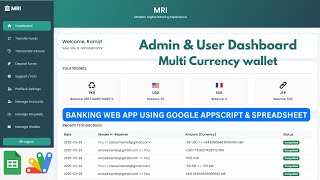
Any business that holds other people's money needs one source of truth, or it loses money to disputes. This is a complete wallet management system on Google Sheets: users add funds, request withdrawals and place orders that debit their balance, while an admin approves every single movement with the proof attached.

What it does

A user tops up by choosing an amount, picking one of the bank accounts you have published (with its QR code), paying, then submitting the transaction ID and a screenshot of the slip. That lands in the admin's wallet queue, where you can open it, check the reference against your actual bank, and approve or reject — approval credits the balance instantly. Withdrawals run the same loop in reverse: the user requests against a payment method they have saved, you approve singly or in bulk, upload your own payment proof, and the balance is debited. Nothing moves without a record on both sides.

Highlights

  • You decide which payment methods users may add — bank transfer, mobile wallet, digital wallet — and nothing outside that list is accepted
  • Orders created for a user can auto-debit their wallet, with tracking ID, delivery partner, status and an attached invoice or PDF
  • Manual credit and debit adjustments for the cases that fall outside the normal flow
  • A reconciliation view, and a print report in every section
  • Direct one-to-one chat: each user talks only to the admin, the admin talks to everyone
  • Per-user colour themes, dark and light mode, and branding applied across the portal
  • SWR caching, so moving between sections is instant rather than a reload

Built with Claude Code

The system was generated in ten prompts using Claude Code in VS Code, built in chunks rather than in one pass, then deployed to Apps Script. All ten prompts are included, along with the demo-data function that creates every sheet so the app works the moment it is deployed.

Who it is for

Resellers, courier and logistics operators, coaching platforms, buying agents — anyone who holds a customer float and currently tracks it in a spreadsheet where the balance and the bank keep disagreeing.

Requirements

  • A Google account (Gmail or Google Workspace)
  • Google Sheets as the database — no server or MySQL needed
  • Google Apps Script web app deployment access
  • Google Drive space for payment slips and order attachments
  • Gmail quota if you want admin email notifications
  • Modern browser (Chrome, Edge, Firefox or Safari)

What's Included

  • Full Apps Script source code (Code.gs + index.html)
  • User wallet portal with top-up and withdrawal
  • Admin approval queues for top-ups and withdrawals
  • Orders module with wallet auto-debit and delivery tracking
  • Transaction ledger and reconciliation with print
  • User-to-admin chat
  • Bank accounts and payment method controls
  • Branding, theme and currency settings
  • One-click demo data setup function
  • The 10 AI prompts used to build the system
  • Full video walkthrough
  • Free support and paid customization on request

Item Details

Versionv1.0
PublishedMay 17, 2026
PlatformGoogle Apps Script
DatabaseGoogle Sheets
CategoryAccounting & Finance
Tagswallet management systemdigital wallet systemcustomer wallet softwaree-wallet admin panelwallet top up and withdrawalpayment approval workflowtransaction ledger softwarewallet reconciliation
VideoWatch walkthrough
LicenseRegular License

How to Build a Wallet Management System – Claude Code + Google Apps Script + Google Sheets

Accounting & Finance

What You Get

Code.gs FilesComplete Apps Script source code files
HTML FilesAll HTML template files included
Google SheetYour own copy with all data and scripts
Setup GuideStep-by-step video tutorials included
6 Months SupportBug fixes, tweaks, and guidance — all free
Free UpdatesAll future updates included at no extra cost
Regular License F7
Subtotal $0.44 USD
Card fee (10%) $0.04 USD
Total $0.48 USD
70% OFF applied — was $1.47 now $0.44
Other payment methods
Wise / Bank Transfer · via WhatsApp +92 343 534 7417 $1.47$0.44
RE
Redotpay
How to Build a Wallet Management System – Claude Code + Google Apps Script + Google Sheets
Secure checkout
Amount due
$0.44$1.47
Amount to pay
Redotpay Account
1002896884
What happens after you pay
  1. Send us the proofEnter your transaction ID and upload the payment screenshot in the form on this page.
  2. We check it by handUsually cleared in 10–30 minutes during working hours — no bots, a person looks at it.
  3. Your file arrives by emailWe open your account and email the login together with the download link, so use an address you can actually open.
Encrypted & secure
Manual review 10–30 min
Receipt by email
How to pay
  1. Copy the Redotpay account
  2. Pay $0.44 via Redotpay
  3. Enter transaction ID below
  4. Submit below — admin verifies & grants access
Manual verification: Typically takes 10 to 30 minutes to verify and grant access during working hours.
We'll find or create your account by this email.
Your country is picked from your location — change it if it's wrong, then type your number without the country code.
Submitted for admin review · typically takes 10 to 30 minutes to verify
Payment invoice
File / CourseHow to Build a Wallet Management System – Claude Code + Google Apps Script + Google Sheets
Invoice CodeF7
Payment MethodRedotpay
Total$0.44
BP
Binance Pay
How to Build a Wallet Management System – Claude Code + Google Apps Script + Google Sheets
Secure checkout
Amount due
$0.44
Amount to pay · zero fee · instant
Scan to Pay with Binance
Scan to Pay
Binance Pay ID
766412546
Account holder: Muahmmad Ramiz Imdad
What happens after you pay
  1. Send us the proofEnter your transaction ID and upload the payment screenshot in the form on this page.
  2. We check it by handUsually cleared in 10–30 minutes during working hours — no bots, a person looks at it.
  3. Your file arrives by emailWe open your account and email the login together with the download link, so use an address you can actually open.
Encrypted & secure
Manual review 10–30 min
Receipt by email
How to pay
  1. Open Binance app → Pay
  2. Scan QR or enter Pay ID
  3. Send $0.44 (any supported crypto)
  4. Copy Order ID from Binance receipt
  5. Paste below & submit for verification
Manual verification: Typically takes 10 to 30 minutes to verify and grant access during working hours.
We'll find or create your account by this email.
Your country is picked from your location — change it if it's wrong, then type your number without the country code.
Submitted for admin review · typically takes 10 to 30 minutes to verify
Payment invoice
File / CourseHow to Build a Wallet Management System – Claude Code + Google Apps Script + Google Sheets
Invoice CodeF7
Payment MethodBinance Pay
Total$0.44
CR
Cryptocurrency
How to Build a Wallet Management System – Claude Code + Google Apps Script + Google Sheets
Secure checkout
Amount due
$0.44
Send exact amount in crypto equivalent
Pick one
Send to this address
15jjKnm6NgxN1Wgbfh7xdBWgbCFztHeNhE
Important: Send only the selected coin on its correct network. Sending on wrong network may result in permanent loss.
What happens after you pay
  1. Send us the proofEnter your transaction ID and upload the payment screenshot in the form on this page.
  2. We check it by handUsually cleared in 10–30 minutes during working hours — no bots, a person looks at it.
  3. Your file arrives by emailWe open your account and email the login together with the download link, so use an address you can actually open.
Encrypted & secure
Manual review 10–30 min
Receipt by email
How to pay
  1. Choose your preferred crypto above
  2. Copy wallet address & send $0.44 equivalent
  3. Enter transaction hash below
  4. Submit below — admin verifies & grants access
Manual verification: Typically takes 10 to 30 minutes to verify and grant access during working hours.
We'll find or create your account by this email.
Your country is picked from your location — change it if it's wrong, then type your number without the country code.
Submitted for admin review · typically takes 10 to 30 minutes to verify
Payment invoice
File / CourseHow to Build a Wallet Management System – Claude Code + Google Apps Script + Google Sheets
Invoice CodeF7
Payment MethodCryptocurrency
Total$0.44
PA
PayPal
How to Build a Wallet Management System – Claude Code + Google Apps Script + Google Sheets
Secure checkout
Amount due
$0.44
Amount to pay
Pay $0.44 with PayPal
Opens PayPal in a new tab. Come back here afterwards with your Transaction ID.
What happens after you pay
  1. Send us the proofEnter your transaction ID and upload the payment screenshot in the form on this page.
  2. We check it by handUsually cleared in 10–30 minutes during working hours — no bots, a person looks at it.
  3. Your file arrives by emailWe open your account and email the login together with the download link, so use an address you can actually open.
Encrypted & secure
Manual review 10–30 min
Receipt by email
How to pay
  1. Tap Pay $0.44 with PayPal — it opens PayPal in a new tab
  2. Copy the Transaction ID from your PayPal receipt
  3. Enter it below with a screenshot of the payment, then submit
  4. We verify it and unlock your file — the download link is emailed to you too
Manual verification: Typically takes 10 to 30 minutes to verify and grant access during working hours.
We'll find or create your account by this email.
Your country is picked from your location — change it if it's wrong, then type your number without the country code.
Submitted for admin review · typically takes 10 to 30 minutes to verify
Payment invoice
File / CourseHow to Build a Wallet Management System – Claude Code + Google Apps Script + Google Sheets
Invoice CodeF7
Payment MethodPayPal
Total$0.44
400+ PROJECTS DELIVERED · 5,000+ HAPPY CLIENTS WORLDWIDE

Need This Customized For Your Business?

We don't just deliver and disappear — every project comes with 6 months of free support. Bug fixes, small tweaks, and guidance included. Choose us without any worry.

5,000+
Happy Clients
24-72h
Fast Delivery
6 Months
Free Support
100%
Money Back
30 min
Avg. Reply

What We Customize

Features & Functions
Add new features, modify existing scripts, custom formulas & automations
API & Integrations
Connect with WhatsApp, Telegram, Payment Gateways, CRM & more
Design & UI Changes
Custom branding, layout redesign, dark mode, mobile optimization
Full Custom Projects
Dashboards, billing systems, inventory, CRM — built from scratch
Get Free Quote on WhatsApp

20-30% advance to start • Clear pricing before we start • 6 months free support after delivery

$0.48
USD · incl. card fee

People choose these

What buyers of this file added to the same order

Petrol Station Management System in Google Sheets (Shifts, Tanks & Accounts) Petrol Station Management System in Google Sheets (Shifts, Tanks & Accounts) Bought with this one Apps Script $1.80 USD How to Build an ISP Billing System: Automated WhatsApp & Call Features How to Build an ISP Billing System: Automated WhatsApp & Call Features Bought with this one Apps Script $0.90 USD Vibe Coding Just Got FREE: This AI Builds Full Apps AND Dashboards From One Prompt (Google Sheets) Vibe Coding Just Got FREE: This AI Builds Full Apps AND Dashboards From One Prompt (Google Sheets) Bought with this one Apps Script $4.51 USD


Reviews & Feedback

What buyers and viewers say about How to Build a Wallet Management System – Claude Code + Google Apps Script + Google Sheets.

No star ratings yet · 15 YouTube comments
Sort
@emmykaluba461 via YouTube
Yes you should add Auto invoice generation it makes the all process faster
1 like on YouTube
@MuhammedMohnishbhai via YouTube
Give me code
@TharikMohamed-r1p via YouTube
Yes, Add Auto Invoice Generation module. Awaiting for next update
@thegames_tws7871 via YouTube
Amazing System 🎉❤❤
@joselitoantipuesto4636 via YouTube
Suggestion what if you can add a affiliate program and commission referral link .
@DaulatV-t2d via YouTube
Nice... Can u share the prompt
@sajidbahar_graphics via YouTube
Teach us how we can make it The way you explain is very good but we don't know how we can make it
@richarrh via YouTube
YES! Vibe coding at its best as always. Keep these Claude Code tutorials coming. This is super helpful content!
@gusadiyanto via YouTube
Wow...wallet by web app, amazing 🎉👍
@JeanTube7777 via YouTube
Por favor nos comparten los IA prompts.
@irfanchauhan495 via YouTube
Yes, Really good application
@CristhianCUribe via YouTube
It's so useful and the items are distrubuted excellent!
@danishmew2873 via YouTube
Rameez Sir Prompt
@DurvishJawaleOfficial via YouTube
Yes,you should add auto invoice generation
@dcstudiofox via YouTube
Plz Provide Entire Code or Prompt