



Important Notice: Your success matters to us. If anything goes wrong after purchase, contact us on WhatsApp and we'll personally get it fixed.

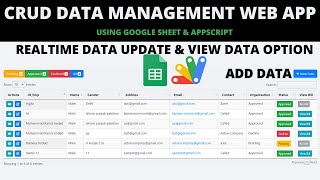
Build a Complete Dynamic Admin & User CRUD Web App with Google Apps Script | C46V2

C46V2 CRUD & Dashboards Weekly Plan Premium Plan VIP Premium Plan
❤️
Need a Custom Business Solution?
Connect with us on WhatsApp to discuss your requirements. Our team will design and develop a tailored software solution aligned with your business workflow, operational needs, and growth objectives.
Build a Complete Dynamic Admin & User CRUD Web App with Google Apps Script | C46V2

Key Features

Admin role with access to every form and database Form and database chosen from dropdowns then loaded Form sheets recognised by the word form in the sheet name Users locked to the single form and database assigned to them Form fields still defined in a sheet rather than in code Input types for text number date dropdown and file Dropdown values listed on the field's own row Required fields marked per field Filter keyword turning any column into a filter Dropdown and date range filters with a clear button Edit and delete rights set separately per user Permission state shown to the user Change your own password from inside the app Duplicate a form sheet to create a new application Records edited and updated inline in the table

Description

The second release of the dynamic CRUD app, and the one that gives the owner a way in. Version one assigned every user a single form and a single database; this version adds an admin who can reach all of them.

The admin view

Sign in as admin and two dropdowns appear: every form sheet in the spreadsheet, and every data sheet. Pick a pair, press Load, and that application opens — its fields, its table, its filters. Form sheets are identified by the word form in the sheet name, so anything else is offered as a database. For someone running six small applications out of one spreadsheet, that is the difference between six deployments and one.

Users stay where they were

A normal user still gets exactly the form and database their login row names, with no dropdowns and nothing else visible. Their edit and delete rights are still set individually, and the app tells them which they hold rather than leaving a button to fail.

Everything that made version one work

Fields are still rows in a form sheet — id, label, input type, required, filterable — covering text, number, date, dropdown and file, with dropdown values on the field's own row. Marking a field filterable still produces a dropdown filter or a start and end date filter with a clear button. Adding a field is still a row and a refresh, never a code change.

New for users

Members change their own password from inside the app, and a new application is created by duplicating a form sheet rather than building one from scratch.

Requirements

  • A Google account (Gmail or Google Workspace)
  • Google Sheets, Google Drive and Google Apps Script
  • Form sheets named with the word form so they are recognised
  • A Login sheet assigning form, database, role and rights per user
  • A Drive folder ID pasted into the script for uploads

What's Included

  • Complete Google Apps Script source code
  • Dynamic CRUD front-end with the admin form and database selector
  • Change password screen
  • Google Sheets structure for logins, form definitions and data
  • Step-by-step video walkthrough of the build
  • Free support from the developer

Item Details

Versionv1.0
PublishedAug 22, 2025
PlatformGoogle Apps Script
DatabaseGoogle Sheets
CategoryCRUD & Dashboards
Tagscrud web appcrud applicationdynamic form builderno code app builderrole based login web appdata entry web appgoogle sheets dashboardgoogle apps script web app
VideoWatch walkthrough
LicenseRegular License

Build a Complete Dynamic Admin & User CRUD Web App with Google Apps Script | C46V2

CRUD & Dashboards

What You Get

Code.gs FilesComplete Apps Script source code files
HTML FilesAll HTML template files included
Google SheetYour own copy with all data and scripts
Setup GuideStep-by-step video tutorials included
6 Months SupportBug fixes, tweaks, and guidance — all free
Free UpdatesAll future updates included at no extra cost
Regular License C46V2
Subtotal $6.00 USD
Total $6.00 USD
Other payment methods
Wise / Bank Transfer · via WhatsApp +92 343 534 7417 $6.00
RE
Redotpay
Build a Complete Dynamic Admin & User CRUD Web App with Google Apps Script | C46V2
Secure checkout
Amount due
$6.00
Total due
Redotpay Account
1002896884
Order summary
ItemBuild a Complete Dynamic Admin & User CRUD Web App with Google Apps Script | C46V2
ReferenceC46V2
Payment MethodRedotpay
Total$6.00
How to pay
  1. Copy the Redotpay account
  2. Pay $6.00 via Redotpay
  3. Enter the transaction reference below
  4. Submit the details below to complete your order
Payments are confirmed typically within 2 business hours (Monday to Saturday). You will receive an email once access is enabled.
Your receipt and download link will be sent to this address.
Country code is set from your location. Change it if needed and enter the number without the code.
Upload a screenshot of the paymentDrop it here or click to browse · JPG or PNG, up to 2 MB
Confirmed typically within 2 business hours (Monday to Saturday)
Encrypted connection
Confirmation in 2 business hours
Emailed receipt
BP
Binance Pay
Build a Complete Dynamic Admin & User CRUD Web App with Google Apps Script | C46V2
Secure checkout
Amount due
$6.00
Total due · no additional fees
Binance Pay ID
766412546
Account holder: Muahmmad Ramiz Imdad
Order summary
ItemBuild a Complete Dynamic Admin & User CRUD Web App with Google Apps Script | C46V2
ReferenceC46V2
Payment MethodBinance Pay
Total$6.00
How to pay
  1. Open the Binance app and choose Pay
  2. Enter the Pay ID
  3. Send $6.00 in any supported asset
  4. Copy the Order ID from your Binance receipt
  5. Enter it below with a screenshot and submit
Payments are confirmed typically within 2 business hours (Monday to Saturday). You will receive an email once access is enabled.
Your receipt and download link will be sent to this address.
Country code is set from your location. Change it if needed and enter the number without the code.
Upload a screenshot of the paymentDrop it here or click to browse · JPG or PNG, up to 2 MB
Confirmed typically within 2 business hours (Monday to Saturday)
Encrypted connection
Confirmation in 2 business hours
Emailed receipt
CR
Cryptocurrency
Build a Complete Dynamic Admin & User CRUD Web App with Google Apps Script | C46V2
Secure checkout
Amount due
$6.00
Send the equivalent amount in the selected asset
Select an asset
Wallet address
15jjKnm6NgxN1Wgbfh7xdBWgbCFztHeNhE
Send only the selected asset on the selected network. Transfers made on a different network cannot be recovered.
Order summary
ItemBuild a Complete Dynamic Admin & User CRUD Web App with Google Apps Script | C46V2
ReferenceC46V2
Payment MethodCryptocurrency
Total$6.00
How to pay
  1. Select an asset above
  2. Copy the wallet address and send the equivalent of $6.00
  3. Enter the transaction hash below
  4. Submit the details below to complete your order
Payments are confirmed typically within 2 business hours (Monday to Saturday). You will receive an email once access is enabled.
Your receipt and download link will be sent to this address.
Country code is set from your location. Change it if needed and enter the number without the code.
Upload a screenshot of the paymentDrop it here or click to browse · JPG or PNG, up to 2 MB
Confirmed typically within 2 business hours (Monday to Saturday)
Encrypted connection
Confirmation in 2 business hours
Emailed receipt
PA
PayPal
Build a Complete Dynamic Admin & User CRUD Web App with Google Apps Script | C46V2
Secure checkout
Amount due
$6.00
Total due
Pay $6.00 with PayPal
Opens PayPal in a new tab. Return here with your Transaction ID to complete the submission.
Order summary
ItemBuild a Complete Dynamic Admin & User CRUD Web App with Google Apps Script | C46V2
ReferenceC46V2
Payment MethodPayPal
Total$6.00
How to pay
  1. Select Pay $6.00 with PayPal; PayPal opens in a new tab
  2. Copy the Transaction ID from your PayPal receipt
  3. Enter it below with a screenshot of the payment, then submit
  4. Your payment is verified and access is enabled; the download link is also emailed to you
Payments are confirmed typically within 2 business hours (Monday to Saturday). You will receive an email once access is enabled.
Your receipt and download link will be sent to this address.
Country code is set from your location. Change it if needed and enter the number without the code.
Upload a screenshot of the paymentDrop it here or click to browse · JPG or PNG, up to 2 MB
Confirmed typically within 2 business hours (Monday to Saturday)
Encrypted connection
Confirmation in 2 business hours
Emailed receipt

Need This Customized For Your Business?

Extra modules, your branding, integrations or reports built on top of this file. You get a clear quote and timeline before any work starts, and support after delivery.

400+
Projects Delivered
89+
Countries Served

What We Customize

Features & Functions
Add new features, modify existing scripts, custom formulas & automations
API & Integrations
Connect with WhatsApp, Payment Gateways, CRM & more
Design & UI Changes
Custom branding, layout redesign, dark mode, mobile optimization
Full Custom Projects
Dashboards, billing systems, inventory, CRM — built from scratch
Get Free Quote on WhatsApp

20-30% advance to start • Clear quote before work begins • Support included after delivery

$6.00
USD · card / manual pay

People choose these

Paid picks from the same category

Admin Dashboard with Google Apps Script & React | Complete CRUD System | E21 Admin Dashboard with Google Apps Script & React | Complete CRUD System | E21 614 views this month Apps Script $1.47 USD Build a Complete Dynamic CRUD Web Dashboard using Google Sheets + Apps Script + React | E14 Build a Complete Dynamic CRUD Web Dashboard using Google Sheets + Apps Script + React | E14 854 views this month Apps Script $6.00 USD How to Build DYNAMIC CRUD Admin Panel with Import/Export | Google Sheets Dashboard | D45 How to Build DYNAMIC CRUD Admin Panel with Import/Export | Google Sheets Dashboard | D45 514 views this month Apps Script $9.02 USD

Reviews & Feedback

What buyers and viewers say about Build a Complete Dynamic Admin & User CRUD Web App with Google Apps Script | C46V2.

No star ratings yet Tap a star to be the first to rate it.
19 comments from
YouTube viewers
Sort
@moussaouinassim4943 via YouTube
Thank you for the tutorial, very helpful and waiting for other video
@sugivtube9180 via YouTube
Great bro. Do a video in student results view and certificate printing. With Google sheet we mode
@gravity_blooms_feast via YouTube
Great tutorial! Clear steps to build a dynamic CRUD app. Very helpful so clear and easy to follow for integrating Google Sheets with web apps. Thanks for sharing..!!
@AlifAnantama via YouTube
Thanks for sharing 👍👍👍👍
@Aleem876 via YouTube
Hi Ramez Interested in taking small projects?
@DurvishJawaleOfficial via YouTube
Best Project ever
@artwellhachunde6417 via YouTube
Amazing!!!!
@imdralok via YouTube
You are a world best developer ☺️.
@khalid20072 via YouTube
Masha_Allah Brother ..... Superb
@EaxminationcenterPs via YouTube
very good masha Allah
@BrandonShields-d1e via YouTube
Looks awesome!
@KieranBroadley via YouTube
Looks amazing !
@IshfaqAhmadBhat-p8m via YouTube
The best video on crud webapp till now❤
@IshfaqAhmadBhat-qv9oi via YouTube
Awesome CRUD web app! Smooth, efficient, and well-designed. Great job! 🔥👏
@VIHANSHARMA-eb8ng via YouTube
Masha_Allah Brother ..... Superb.... So Innovative and smart Features
@etayojuanc via YouTube
Excelent work.
@rafikulislam6512 via YouTube
Amazing. It is one of the best app script codes particularly the Crud web app.🌹🌹🌹🌹🌹
@sciencemind4824 via YouTube
Great sir.
@mehidul via YouTube
Just wahoo





