







 @freddymoreno7653
via YouTube
@freddymoreno7653
via YouTube
Buenisismo
1 like on YouTube

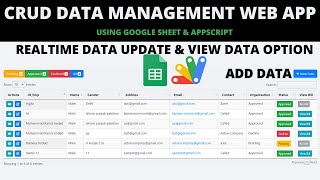
The starting point for almost every internal tool: a React 18 admin dashboard with proper create, read, update and delete, roles, an approval chain and an audit trail — with a Google Sheet doing the job of the database.
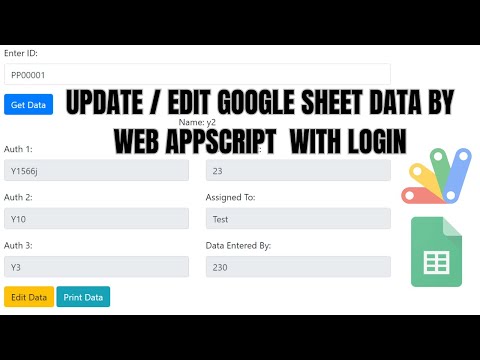
Records are created, edited and deleted through a React front end served straight out of Apps Script, not through a form that dumps rows at the bottom of a sheet. The data table on top of it filters, searches and exports to CSV or PDF, which is usually the first thing anyone asks for once the data is in.
Entries can pass through a multi-level approval workflow before they count, so a junior enters and a senior confirms. Every action is written to an activity log — who created, who changed, who approved, and when. That log is what turns a CRUD demo into something a business will actually trust.
Authentication separates admin from user, and role-based access decides which screens and which actions each one gets. The dashboard itself carries live charts and analytics drawn from the same sheet, so the numbers move as the data does.
There is no database to provision, no hosting bill and no connection string. The sheet stays readable and exportable, non-technical staff can look at the raw data when they need to, and the app deploys as a web app that works on a phone as well as a laptop. Use it as it stands, or as the skeleton for whatever CRUD system you are actually building.
| Version | v1.0 |
| Published | Dec 19, 2025 |
| Platform | Google Apps Script |
| Database | Google Sheets |
| Category | CRUD & Dashboards |
| Tags | |
| Video | Watch walkthrough |
| License | Regular License |
Your features, branding and reports, built on this system. Free quote before any work starts.
Chat on WhatsApp



Extra modules, your branding, integrations or reports built on top of this file. You get a clear quote and timeline before any work starts, and support after delivery.
20–30% advance to start · Clear quote before work begins · Support after delivery
What we customize
Paid picks from the same category
What buyers and YouTube viewers say about this project.
@freddymoreno7653
via YouTube
 @rasc-c5e
via YouTube
@rasc-c5e
via YouTube
 @zohairdilawar116
via YouTube
@zohairdilawar116
via YouTube
 @balsaviclasses
via YouTube
@balsaviclasses
via YouTube
 @hillriderr
via YouTube
@hillriderr
via YouTube
 @foodmastiIndia
via YouTube
@foodmastiIndia
via YouTube
 @msi________2760
via YouTube
@msi________2760
via YouTube
 @GajananFunde
via YouTube
@GajananFunde
via YouTube
 @cookitchen8565
via YouTube
@cookitchen8565
via YouTube
 @computersecret
via YouTube
@computersecret
via YouTube
 @SumanGraphics-c4f
via YouTube
@SumanGraphics-c4f
via YouTube
 @thegames_tws7871
via YouTube
@thegames_tws7871
via YouTube
 @loksewapath
via YouTube
@loksewapath
via YouTube
 @digitalsathi
via YouTube
@digitalsathi
via YouTube
 @mitcomputernepal
via YouTube
@mitcomputernepal
via YouTube
 @sathigraphics
via YouTube
@sathigraphics
via YouTube
 @digitalsathi2
via YouTube
@digitalsathi2
via YouTube
 @educationnews3226
via YouTube
@educationnews3226
via YouTube
 @IshfaqAhmadBhat-p8m
via YouTube
@IshfaqAhmadBhat-p8m
via YouTube
 @whacenter
via YouTube
@whacenter
via YouTube
 @gusadiyanto
via YouTube
@gusadiyanto
via YouTube
 @vipulchaudhari4437
via YouTube
@vipulchaudhari4437
via YouTube
 @artwellhachunde6417
via YouTube
@artwellhachunde6417
via YouTube
 @mohammedkabir7869
via YouTube
@mohammedkabir7869
via YouTube
 @LearnWithJaySir
via YouTube
@LearnWithJaySir
via YouTube
 @Ilf-ar
via YouTube
@Ilf-ar
via YouTube
 @adityasingh4509
via YouTube
@adityasingh4509
via YouTube
 @mfaizan5075
via YouTube
@mfaizan5075
via YouTube
 @TOP10-s3v1l
via YouTube
@TOP10-s3v1l
via YouTube
 @RafikulIslam-uc9rr
via YouTube
@RafikulIslam-uc9rr
via YouTube
@RafikulIslam-uc9rr
via YouTube
@RafikulIslam-uc9rr
via YouTube
 @umersir0510
via YouTube
@umersir0510
via YouTube
 @Creepy000
via YouTube
@Creepy000
via YouTube
 @STEPHENODHIAMBO-i7q
via YouTube
@STEPHENODHIAMBO-i7q
via YouTube
 @wmmasha5729
via YouTube
@wmmasha5729
via YouTube
 @M.K.Kalaiyarasan
via YouTube
@M.K.Kalaiyarasan
via YouTube
 @rafikulislam6512
via YouTube
@rafikulislam6512
via YouTube
 @bgmbiblecollege
via YouTube
@rafikulislam6512
via YouTube
@bgmbiblecollege
via YouTube
@rafikulislam6512
via YouTube