
Important Notice: Your success matters to us. If anything goes wrong after purchase, contact us on WhatsApp and we'll personally get it fixed.

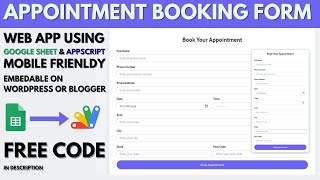
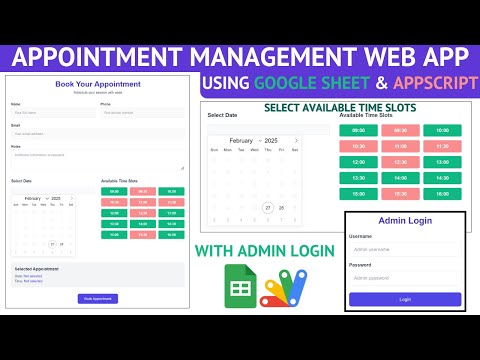
Appointment Booking Form with Time Slots Using Google Sheets & Apps Script | B41

B41 Booking & Appointments Premium Plan Weekly Plan VIP Premium Plan
❤️
Need a Custom Business Solution?
Connect with us on WhatsApp to discuss your requirements. Our team will design and develop a tailored software solution aligned with your business workflow, operational needs, and growth objectives.
Appointment Booking Form with Time Slots Using Google Sheets & Apps Script | B41

Key Features

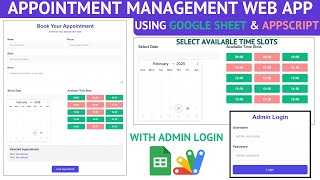
Booking form with name phone email and notes Time slots generated automatically from your opening hours Fixed slot length such as 30 minutes Slot window configurable in the script Date picker with day month and year Past months hidden from selection Selected date and time shown back for review before submitting Submission written straight to Google Sheets Mobile-friendly responsive layout Sheet ID set in one place Deploys as a Google Apps Script web app

Description

A booking form that offers real appointment times instead of a free-text box. Slots are generated from your own opening hours, so a customer can only pick a time you are actually open.

Slots, not guesses

A plain date-and-time field invites bookings at 3am and at 1pm on a day you close at noon — and every one of those is a phone call to undo. Here the slots are built from a window you set: open at nine, close at four, thirty minutes each, and the form offers exactly those. Change the window and the slots regenerate. Any business that operates on fixed hours — a clinic, a salon, a workshop, a consultancy — needs this rather than a calendar field.

Dates that make sense

Past months are not shown in the picker. A booking in a month that has already gone is not a mistake worth allowing, and removing it silently prevents the most common bad submission.

Confirm before committing

Before submitting, the form shows back the date and time chosen and asks whether it is correct. It is one line, and it catches the slot picked by accident on a phone — which is where most of these bookings are made, and why the whole form is responsive.

Where the bookings go

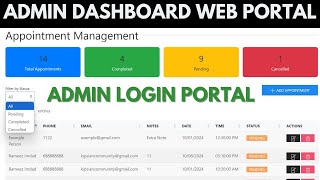
Straight into your Google Sheet, with the name, phone, email, notes, date and slot. Pair it with the appointment admin dashboard if you want staff to filter, update statuses and count pending bookings; on its own it is the public form.

Requirements

  • A Google account (Gmail or Google Workspace)
  • Google Sheets and Google Apps Script — no hosting or server needed
  • Your opening and closing times and slot length to configure
  • Your Sheet ID set in the script
  • A website or link to share the form from

What's Included

  • Complete Google Apps Script source code
  • Booking form with name, phone, email and notes
  • Automatic time slot generation from your opening hours
  • Date picker that hides past months
  • Review step showing the selected date and time
  • Mobile-friendly responsive layout
  • Google Sheet structure for the bookings
  • Deployment walkthrough for publishing as a web app
  • Step-by-step video walkthrough of the full build
  • Free support from the developer

Item Details

Versionv1.0
PublishedAug 22, 2025
PlatformGoogle Apps Script
DatabaseGoogle Sheets
CategoryBooking & Appointments
Tagsappointment booking systemappointment booking form with time slotsappointment scheduling softwarebooking form google sheetstime slot booking web appclinic appointment formsalon booking formonline appointment form
VideoWatch walkthrough
LicenseRegular License
Subscription Verification Required
This is a free file. Subscribe to our YouTube channel to unlock the source code + Google Sheet. One click — no payment. Google only confirms you are subscribed.
Verify Now
Free download

Subscribe & Unlock Source Code

Subscribe on YouTube, then verify with one click. No payment, no card. Google is used only to confirm your subscription.

What you get

  • Code.gs + HTML filesThe complete Apps Script project
  • Google SheetYour own copy with the data
  • Setup guideInstall steps from start to finish

Not subscribed yet? Subscribe to our channel

Browse More Free Files

Need This Customized For Your Business?

Extra modules, your branding, integrations or reports built on top of this file. You get a clear quote and timeline before any work starts, and support after delivery.

400+
Projects Delivered
89+
Countries Served

What We Customize

Features & Functions
Add new features, modify existing scripts, custom formulas & automations
API & Integrations
Connect with WhatsApp, Payment Gateways, CRM & more
Design & UI Changes
Custom branding, layout redesign, dark mode, mobile optimization
Full Custom Projects
Dashboards, billing systems, inventory, CRM — built from scratch
Get Free Quote on WhatsApp

20-30% advance to start • Clear quote before work begins • Support included after delivery

Free
Source Code File

People choose these

Paid picks from the same category

How to Create an Appointment Booking System with Login Using Google Apps Script | C37 How to Create an Appointment Booking System with Login Using Google Apps Script | C37 481 views this month Apps Script I Built an NFC Attendance System with AI (PHP & MySQL) I Built an NFC Attendance System with AI (PHP & MySQL) 75 views this month PHP Build a Complete Billing & Invoicing SaaS System With Claude AI Build a Complete Billing & Invoicing SaaS System With Claude AI 315 views this month PHP

Reviews & Feedback

What buyers and viewers say about Appointment Booking Form with Time Slots Using Google Sheets & Apps Script | B41.

No star ratings yet Tap a star to be the first to rate it.
3 comments from
YouTube viewers
Sort
@krishnanmanoj1 via YouTube
Wonderful❤
@abdullahquhtani4247 via YouTube
Excellent. It will be great if you could let the script to read schedule table from the sheet and users date as well so user doesn’t have to fill his data every time he makes booking. I have some ideas that’ll help you to make this script more functional and beneficial.
@ambidextrousanmol via YouTube
Looking forward to this 😊