Need a customized project? We build it to your exact requirements.Contact us on WhatsApp

Student Attendance System with Teacher Login – Google Sheets

R32 Attendance Systems Weekly Plan Premium Plan VIP Premium Plan
Attendance System using Google Sheets and Appscript with Login | R32
You get
  • Google Sheet link
  • Source code file
  • Resale rights
  • Edit rights
  • Setup guide
  • AI setup help

Key Features

Teacher login bound to one class sheet Each teacher sees only their own students and section Present leave and absent marked per student Submit blocked until every student is marked Written-leave confirmation prompt before marking leave Confirmation dialog before the register is saved Attendance written straight into the class sheet Conditional formatting recipe for colouring P L and A New class added by adding a sheet and a login row X-Frame-Options set to allow embedding Embeds in Blogger WordPress or any website by iframe Google Sheets as the database

Description

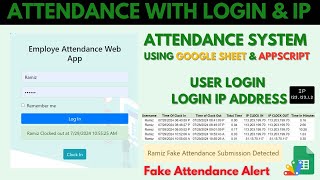
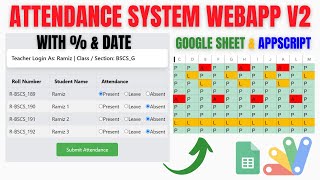
A register for a school or academy where each teacher logs in and gets exactly one thing: their own class, their own section, and a Present / Leave / Absent button beside every student's name.

One teacher, one sheet

The login table holds three columns — username, password, and the sheet that teacher owns. That binding is the whole access model: a teacher sees the students in their sheet and nobody else's. Adding a class means adding a sheet and a login row; there is no code to change and no permissions screen to configure.

It refuses an incomplete register

Press submit with a student unmarked and it stops you: attendance is required for every student. A half-filled register is worse than none at all, because an unmarked student is silently neither present nor absent, and nobody notices until the monthly report is wrong. Here you finish the class or you do not submit it.

The leave prompt

Marking a student as on leave raises a confirmation first — have you actually received the written leave application, signed as your institution requires? Leave is the mark that gets given casually and then defended later. Making the teacher confirm it at the moment of marking is a one-line change in behaviour that holds up when a parent queries the record.

Where the data goes

Straight into that class's sheet as P, L or A. A conditional-formatting recipe is included so the marks colour themselves — present in green, absent in red — turning the sheet into a register you can read at a glance. The web app also allows frame embedding, so it can live inside your own school website rather than on a Google URL.

Requirements

  • A Google account (Gmail or Google Workspace)
  • Google Sheets and Google Apps Script — no hosting or server needed
  • One sheet per class, with the student list
  • A login sheet holding username, password and sheet name per teacher
  • A website or blog if you want to embed it by iframe (optional)

What's Included

  • Complete Google Apps Script source code
  • Teacher login bound to a single class sheet
  • Present, leave and absent marking per student
  • Complete-register validation before submit
  • Written-leave confirmation prompt
  • Attendance written into the class sheet as P, L or A
  • Conditional formatting recipe for colour-coded marks
  • iframe embedding for your own website
  • Step-by-step video walkthrough including setup and deployment
  • Free support from the developer

Item Details

Versionv1.0
PublishedAug 22, 2025
PlatformGoogle Apps Script
DatabaseGoogle Sheets
CategoryAttendance Systems
Tagsstudent attendance system source codeteacher attendance google sheetattendance management system google sheetsstudent attendance system google sheetsattendance system google apps scriptschool attendance systemteacher login attendance systemclass attendance web app
VideoWatch walkthrough
LicenseRegular License
Regular License R32
Subtotal $2.60 USD
Total $2.60 USD
Other payment methods
Wise / Bank Transfer · via WhatsApp +92 343 534 7417 $5.20$2.60
Redotpay
Attendance System using Google Sheets and Appscript with Login | R32
Secure checkout
Amount due
$2.60$5.20
Total due
Redotpay Account
1002896884
How to pay
  1. Copy the Redotpay account
  2. Pay $2.60 via Redotpay
  3. Enter the transaction reference below
  4. Submit the details below to complete your order
Order details$2.60
Order summary
ItemAttendance System using Google Sheets and Appscript with Login | R32
ReferenceR32
Payment MethodRedotpay
Total$2.60
Your payment proofReference + screenshot — takes a minute
Your receipt and download link will be sent to this address.
Country code is set from your location. Change it if needed and enter the number without the code.
Upload a screenshot of the paymentDrop it here or click to browse · JPG or PNG, up to 2 MB
Confirmed typically within 2 hours (24/7)
Encrypted connection
Confirmation in 2 hours
Emailed receipt
Binance Pay
Attendance System using Google Sheets and Appscript with Login | R32
Secure checkout
Amount due
$2.60
Total due · no additional fees
Binance Pay ID
766412546
Account holder: Muahmmad Ramiz Imdad
How to pay
  1. Open the Binance app and choose Pay
  2. Enter the Pay ID
  3. Send $2.60 in any supported asset
  4. Copy the Order ID from your Binance receipt
  5. Enter it below with a screenshot and submit
Order details$2.60
Order summary
ItemAttendance System using Google Sheets and Appscript with Login | R32
ReferenceR32
Payment MethodBinance Pay
Total$2.60
Your payment proofReference + screenshot — takes a minute
Your receipt and download link will be sent to this address.
Country code is set from your location. Change it if needed and enter the number without the code.
Upload a screenshot of the paymentDrop it here or click to browse · JPG or PNG, up to 2 MB
Confirmed typically within 2 hours (24/7)
Encrypted connection
Confirmation in 2 hours
Emailed receipt
Cryptocurrency
Attendance System using Google Sheets and Appscript with Login | R32
Secure checkout
Amount due
$2.60
Send the equivalent amount in the selected asset
Select an asset
Wallet address
15jjKnm6NgxN1Wgbfh7xdBWgbCFztHeNhE
Send only the selected asset on the selected network. Transfers made on a different network cannot be recovered.
How to pay
  1. Select an asset above
  2. Copy the wallet address and send the equivalent of $2.60
  3. Enter the transaction hash below
  4. Submit the details below to complete your order
Order details$2.60
Order summary
ItemAttendance System using Google Sheets and Appscript with Login | R32
ReferenceR32
Payment MethodCryptocurrency
Total$2.60
Your payment proofReference + screenshot — takes a minute
Your receipt and download link will be sent to this address.
Country code is set from your location. Change it if needed and enter the number without the code.
Upload a screenshot of the paymentDrop it here or click to browse · JPG or PNG, up to 2 MB
Confirmed typically within 2 hours (24/7)
Encrypted connection
Confirmation in 2 hours
Emailed receipt
PayPal
Attendance System using Google Sheets and Appscript with Login | R32
Secure checkout
Amount due
$2.60
Total due
Pay $2.60 with PayPal
Opens PayPal in a new tab. Return here with your Transaction ID to complete the submission.
How to pay
  1. Select Pay $2.60 with PayPal; PayPal opens in a new tab
  2. Copy the Transaction ID from your PayPal receipt
  3. Enter it below with a screenshot of the payment, then submit
  4. Your payment is verified and access is enabled; the download link is also emailed to you
Order details$2.60
Order summary
ItemAttendance System using Google Sheets and Appscript with Login | R32
ReferenceR32
Payment MethodPayPal
Total$2.60
Your payment proofReference + screenshot — takes a minute
Your receipt and download link will be sent to this address.
Country code is set from your location. Change it if needed and enter the number without the code.
Upload a screenshot of the paymentDrop it here or click to browse · JPG or PNG, up to 2 MB
Confirmed typically within 2 hours (24/7)
Encrypted connection
Confirmation in 2 hours
Emailed receipt

Need This Customized For Your Business?

Extra modules, your branding, integrations or reports built on top of this file. You get a clear quote and timeline before any work starts, and support after delivery.

400+
Projects Delivered
91+
Countries Served

What We Customize

Features & Functions
Add new features, modify existing scripts, custom formulas & automations
API & Integrations
Connect with WhatsApp, Payment Gateways, CRM & more
Design & UI Changes
Custom branding, layout redesign, dark mode, mobile optimization
Full Custom Projects
Dashboards, billing systems, inventory, CRM — built from scratch
Get Free Quote on WhatsApp

20-30% advance to start • Clear quote before work begins • Support included after delivery

$2.60
USD · card / manual pay

People choose these

Paid picks from the same category

I Built a GPS Attendance Management System in PHP MySQL I Built a GPS Attendance Management System in PHP MySQL 170 views this month PHP $6.52 USD Attendance System with Device-Based Security Using Google Sheets & Apps Script | E9 Attendance System with Device-Based Security Using Google Sheets & Apps Script | E9 48 views this month Apps Script $1.95 USD How to Make Google Apps Script Attendance System Clock In/Out with IP & Selfie | D39 How to Make Google Apps Script Attendance System Clock In/Out with IP & Selfie | D39 73 views this month Apps Script $1.16 USD

Reviews & Feedback

What buyers and viewers say about Attendance System using Google Sheets and Appscript with Login | R32.

No star ratings yet Tap a star to be the first to rate it.
6 comments from
YouTube viewers
Sort
@BHAKTHI_SHAKTHI via YouTube
source code not opened.
@hanselporfirio6499 via YouTube
Impressive work!
@iqbalmohammad786 via YouTube
Source code
@kulvinder8211 via YouTube
Source code de dijiye
@krishnanmanoj1 via YouTube
❤ Wonderfull
@tahirjai via YouTube
Nice work,