





Important Notice: Your success matters to us. If anything goes wrong after purchase, contact us on WhatsApp and we'll personally get it fixed.

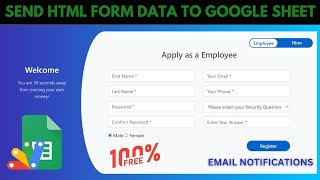
Create HTML Data Entry Form for Google Sheets | Application Form To Google Sheet with Email | D30

D30 Forms & Data Entry Automation & Integration Premium Plan Weekly Plan VIP Premium Plan
❀️
Need a Custom Business Solution?
Connect with us on WhatsApp to discuss your requirements. Our team will design and develop a tailored software solution aligned with your business workflow, operational needs, and growth objectives.
Create HTML Data Entry Form for Google Sheets | Application Form To Google Sheet with Email | D30

Key Features

HTML data entry form that writes straight into Google Sheets Automatic email confirmation sent to the applicant Mobile-responsive form layout Real-time field validation Duplicate entry prevention Google Sheets as the database Google Apps Script backend with no server needed

Description

A ready-made HTML application form that saves every submission straight into a Google Sheet and emails the applicant a confirmation automatically. If you are still collecting applications over email or WhatsApp and copying them into a spreadsheet by hand, this replaces that entire step.

What it does

The form is a normal web page you can host anywhere or serve from Apps Script. On submit, the entry is validated, checked against existing rows so the same person cannot register twice, written as a new row in your Google Sheet, and confirmed by email to whoever filled it in β€” all in one pass, with no manual work in between.

Highlights

  • Clean HTML form that posts directly to Google Sheets
  • Automatic email confirmation on every submission
  • Real-time validation so bad data is caught before it is saved
  • Duplicate prevention on repeat submissions
  • Mobile-responsive layout that works on a phone
  • Google Sheets as the database β€” sort, filter and export as usual
  • No server, no hosting bill, no database to configure

Who it is for

HR teams collecting job applications, schools and academies taking admission forms, businesses running registrations or enquiry forms, and developers who want a working HTML-to-Sheets pattern they can drop into a client project instead of building it from scratch.

Requirements

  • A Google account (Gmail or Google Workspace)
  • Google Sheets and Google Apps Script access
  • Permission to authorise the script for sending email
  • A modern browser (Chrome, Edge, Firefox or Safari)

What's Included

  • Complete HTML form source code
  • Google Apps Script backend that writes to the sheet and sends the email
  • Google Sheets structure for the submissions
  • Step-by-step video walkthrough
  • Free support from the developer

Item Details

Versionv1.0
PublishedSep 4, 2025
PlatformGoogle Apps Script
DatabaseGoogle Sheets
CategoryForms & Data Entry, Automation & Integration
Tagshtml data entry form google sheetsapplication form to google sheetsgoogle sheets data entry formhtml form to google sheet with emailcustom form google sheets apps scriptonline application form freeform with email notification google sheetsgoogle apps script web app
VideoWatch walkthrough
LicenseRegular License
Subscription Verification Required
This is a free file. Subscribe to our YouTube channel to unlock the source code + Google Sheet. One click β€” no payment. Google only confirms you are subscribed.
Verify Now
Free download

Subscribe & Unlock Source Code

Subscribe on YouTube, then verify with one click. No payment, no card. Google is used only to confirm your subscription.

What you get

  • Code.gs + HTML filesThe complete Apps Script project
  • Google SheetYour own copy with the data
  • Setup guideInstall steps from start to finish

Not subscribed yet? Subscribe to our channel

Browse More Free Files

Need This Customized For Your Business?

Extra modules, your branding, integrations or reports built on top of this file. You get a clear quote and timeline before any work starts, and support after delivery.

400+
Projects Delivered
89+
Countries Served

What We Customize

Features & Functions
Add new features, modify existing scripts, custom formulas & automations
API & Integrations
Connect with WhatsApp, Payment Gateways, CRM & more
Design & UI Changes
Custom branding, layout redesign, dark mode, mobile optimization
Full Custom Projects
Dashboards, billing systems, inventory, CRM β€” built from scratch
Get Free Quote on WhatsApp

20-30% advance to start β€’ Clear quote before work begins β€’ Support included after delivery

Free
Source Code File

People choose these

Paid picks from the same category

I Built an NFC Attendance System with AI (PHP & MySQL) I Built an NFC Attendance System with AI (PHP & MySQL) 72 views this month PHP Build a Complete Billing & Invoicing SaaS System With Claude AI Build a Complete Billing & Invoicing SaaS System With Claude AI 315 views this month PHP Best Trading Journal? I Built My Own With Google Sheets & AI Best Trading Journal? I Built My Own With Google Sheets & AI 230 views this month Apps Script

Reviews & Feedback

What buyers and viewers say about Create HTML Data Entry Form for Google Sheets | Application Form To Google Sheet with Email | D30.

No star ratings yet Tap a star to be the first to rate it.
30 comments from
YouTube viewers
Sort
@saalimzafar93 via YouTube
If the email is already registered, the error should appear during email entry, not after submitting the full form.
5 likes on YouTube
@RAYAFTAB via YouTube
Great video! Thanks for not only explaining how to use the HTML form with Google Sheets but also for sharing the complete code
2 likes on YouTube
@pinkygamit9139 via YouTube
Thanks For sharing...πŸ™πŸ™πŸ™
2 likes on YouTube
@SURENDRAYADAV-b6x6s via YouTube
I’m so impressed I had to comment immediately!
1 like on YouTube
@DjunaediEdday via YouTube
sedang belajar HTML semoga bisa dipahami
1 like on YouTube
@Kz_Orda via YouTube
It's interesting! Thank you for sharing best practices!
1 like on YouTube
@mdabdullah0710 via YouTube
Great Video
@jimidi1850 via YouTube
I got the code at the website and hope your still responding here. Everything is working except the email to the applicant. What is the correct coding to send the email to the applicant?
@AmilaJayasuriya-l1y via YouTube
This is good video. i want to add real-time location to this form
@iofan7067 via YouTube
thanks bro πŸ™
@Hari-xq1qq via YouTube
Thank you for sharing
@TheSportsStudio578 via YouTube
How do name and email address suggest auto?.
@ssivatha via YouTube
Great video and thank you very much.
@technoh4cksoficial via YouTube
Yo le agregarΓ­a que desde la hoja de cΓ‘lculo se pueda agregar los puestos de trabajo y demΓ‘s y se puede hacer desde una web HTML tambiΓ©n usando la URL de apps script como API
@zachariamphye6939 via YouTube
Thank you Sir for a simplified solution to form building
@SantiagoMatiasMartinez-p3i via YouTube
gran contribuciΓ³n, no sabia de esto
@miyamotojc via YouTube
Good contribution, Greetings from the Isthmus of Tehuantepec, Oaxaca, Mexico
@lucianopessanha7437 via YouTube
Very good 😎✌️
@viniciocoelho3538 via YouTube
Awesome mate. Thanks. Keep up with it.
@mahamaththaya via YouTube
Super this. You are very performance .❀..
@RafikulIslam-uc9rr via YouTube
Super, ❀very helpfully video
@Sanaullahkh998 via YouTube
Most waiting video, thanks sir
@Badamasi24 via YouTube
This is awesome
@cedie05 via YouTube
Very nice!
@jordanfelipe31 via YouTube
Interesting
@souratech5767 via YouTube
hello sir very niceπŸ™
@ejazchiniot via YouTube
Good informative video.
@MichaelS.Glasgow via YouTube
Awesome stuff. Keep it coming πŸ”₯πŸ”₯
@getabu_brian via YouTube
This is soo good. Top notch creativity
@irfanchauhan495 via YouTube
Superb ! Very Informative Video.... Thank You !