
Save Videos, Music and Pictures. Free, From One Link.
RS Downloader saves public videos, MP3 and pictures from a link, with a queue, pause and resume, and a one-click button in your browser. It also copies your downloads straight to a USB drive or phone.
- FreeEvery feature
- MP4 · MP3Video, music, pictures
- ResumePause any time
- USBAnd phones
Made forMobile & USB shopsStudentsTeachersOfficesCreatorsFamilies
See It Before You Install.
Real screens from the software, filled with demo downloads.
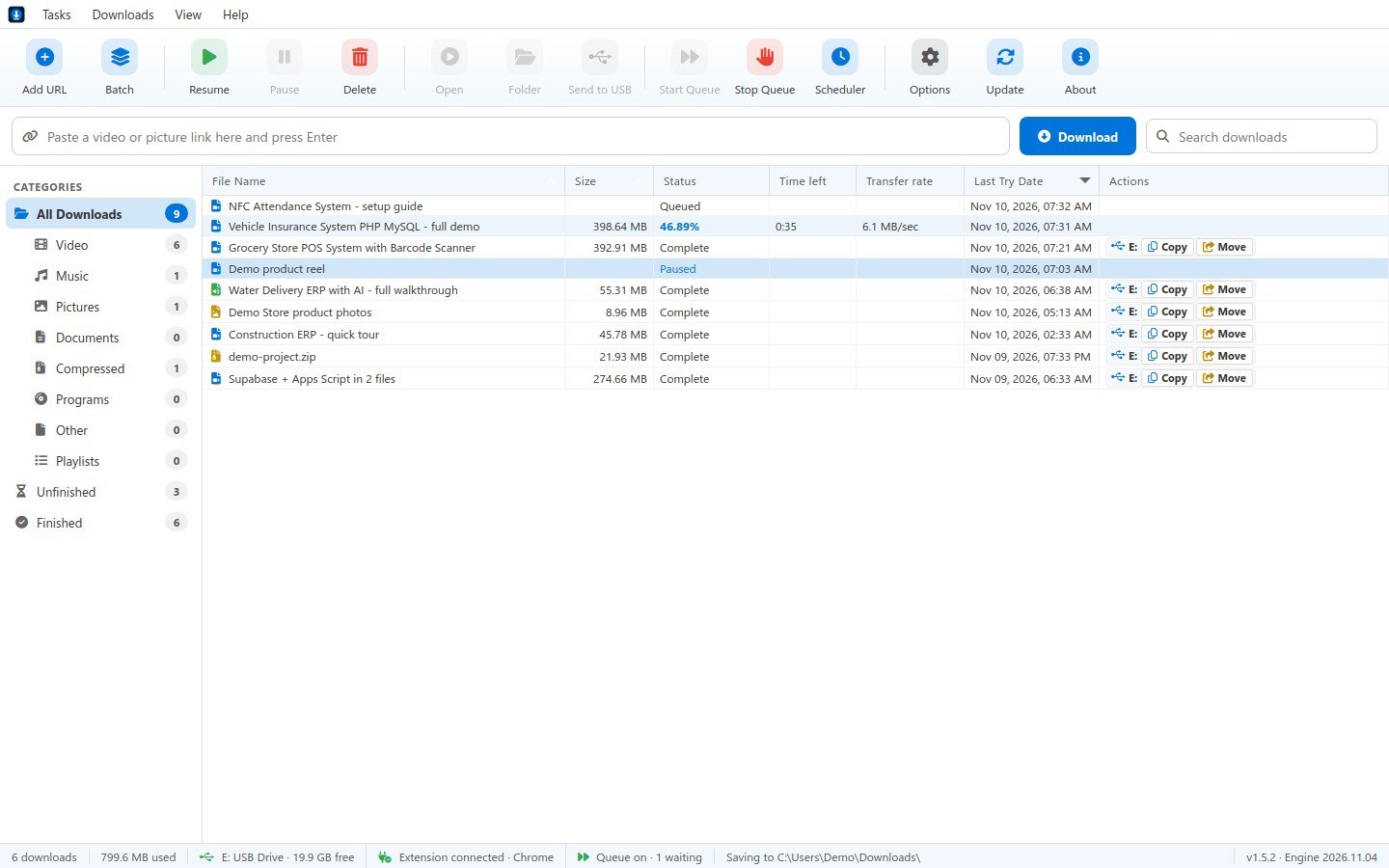
Every download in one list: categories on the left, progress, speed and time left, and Copy or Move to a USB drive in one click.
One App for Every Download.
Every feature is free. No plans, no limits on how many files you save.
Download anything you can open
- Video in any qualityPick from every quality the post has, saved as MP4 or MKV.
- Music onlySave the sound as MP3 (320 or 128), M4A or WAV.
- Pictures from postsEvery picture of a post, saved together in one folder.
- Whole playlistsTurn on Whole playlist and every video comes down in one go.
- Any file linkZip, PDF or program links download with up to 16 connections and resume.
- Subtitles, cover and chaptersOptional .srt subtitles; the cover picture and chapters go inside the file.
You stay in control
- Queue and batchAdd many links at once. They download one after another, or two or three together.
- Pause and resumePause any download and carry on later from where it stopped, even after a restart.
- SchedulerStart the queue by itself at the time you set, every day.
- Speed limitKeep the internet free for others: 0.5 to 10 MB a second, or no limit.
- Sorted into foldersVideos, Music, Pictures, Documents, Compressed and Programs, each in its own folder.
- Download windowPercent, speed, time left and time taken for every download, in its own small window.
Works with your browser
- Download this video buttonA small bar over videos in Chrome and Edge. Click it and pick the quality.
- Catches browser downloadsFile downloads from your browser go to RS Downloader, with resume.
- Copy a link, it asksCopy a video link anywhere and RS Downloader offers to download it.
USB drives and phones
- Copy or move in one clickSend finished downloads straight to a USB drive, SD card or phone.
- Checks before it copiesFree space and the 4 GB limit of older USB drives are checked first.
- Updates itselfThe app and its download engine update with one click, so new sites keep working.
From Link to File in Four Steps.
No coding, no settings to learn.
Download and install
Install RS Downloader on your Windows PC. No account and no sign-in.
Paste a link
Paste the link of a public video or post, or click the bar over a video in your browser.
Pick quality and folder
Choose video, MP3 or pictures and where to save, then press Start Download.
Open it, or send it on
Open the file, show it in its folder, or copy it to a USB drive or phone.
Yes. It is free to download and use, with every feature. No account, no sign-in and no card.
Public videos and posts from popular video and social sites, and direct file links such as zip or PDF files. Private, members-only and paid videos are not supported, because the app never signs in to any site.
Download only videos and pictures you own, or that the owner allows you to save, and follow each site's terms. RS Downloader is a tool; what you save with it is your responsibility.
The app keeps the extension in its own folder. Open Options › Browser extension in the app for the steps: open chrome://extensions (or edge://extensions), turn on Developer mode and press Load unpacked.
Yes. The installer is not code-signed yet, so Windows may show "Windows protected your PC". Press More info, then Run anyway. Download it only from this page.
Yes. The app updates itself, and the Update button also refreshes the download engine. If a site stops working, press Update first.
In your Downloads folder, sorted into Videos, Music, Pictures and more. You can pick your own folder for each category.
Free for Everyone.
Download It Today.
RS Downloader is an independent tool made by Rameez Scripts. It is not made by, or connected with, any video or social media site. Download only content you have the right to save, and follow each site's terms.