
Read onlyStarts here
- Reads chats and customers
- Reads business info and reply times
- Reads orders, products, campaigns and reports
- Changes nothing, sends nothing
RS WhatsApp sends your campaigns, answers customers with AI, saves orders and sends product photos, all from your own PC. Sign in with Google and try every feature free for 1 day.
Made forShopsClothingElectronicsGroceryRestaurantsClinicsPharmaciesSalonsGymsSchoolsReal estateTravelHotelsServicesFreelancersand more
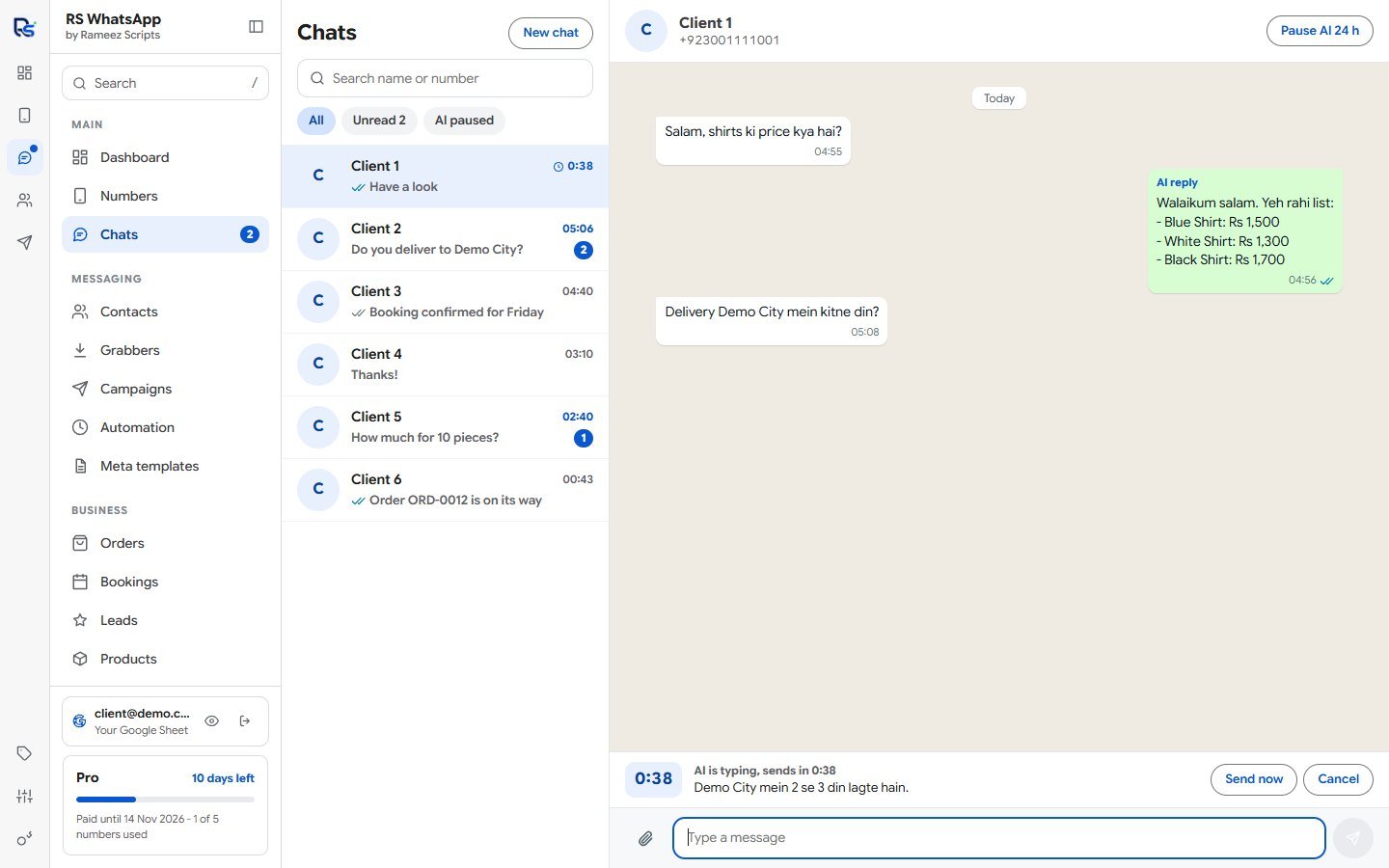
Real screens from the software, filled with demo data.
Every chat in one place, with the timer before each AI reply.
Every feature is in both plans and in the free trial. Plans differ only in numbers and messages a day.
RS WhatsApp comes with its own MCP server. Connect your AI agent with one command, then ask it in plain words from your terminal.
$ claude mcp add rs-whatsapp -s user -- ...
Added MCP server rs-whatsapp

> Show my unread chats and answer Client 2

rs-whatsapp list_chats
rs-whatsapp read_chat
2 unread. Client 2 asks about delivery to
Demo City. Client 5 asks the price for 10.

rs-whatsapp get_business_info
rs-whatsapp draft_reply
The reply for Client 2 is waiting in
RS WhatsApp. Press Send when you are happy.
Your agent never gets your AI keys or Meta token, cannot send files, and cannot turn on automatic sending. What it reads goes to the company that runs it.
No coding and no technical skills needed.
Download the app and install it on your PC.
Sign in and your 1-day free trial starts. No card and no key.
Scan a QR code, or connect the Official WhatsApp API.
Add your business info, AI key and products, then send your first campaign.
Try it free for 1 day first. Then pay for 30 days at a time: nothing renews or charges you by itself.
| What you get | Free trial | Starter | Pro |
|---|---|---|---|
| Length | 1 day | 30 days | 30 days |
| WhatsApp numbers | 1 | 1 | 5 |
| Messages | 5 a day | 50 a day | Unlimited |
| AI contacts | 5 a day | 50 a day | Unlimited |
| Every feature, Claude Code and Codex | Yes | Yes | Yes |
| Updates | Free | Free | Free |
| Support | WhatsApp and email | WhatsApp and email | Priority |
USD 2.99
30 days. For one number and a steady flow of customers.
USD 9.99
30 days. For busy businesses and several numbers.
Once you pay, your Gmail is activated. There is no key: sign in with that Gmail and use the software. Card and Google Pay are instant. Other methods take effect after we check the payment.
Prices shown in US dollars. All updates are free. AI usage is billed by your AI company on your own key, and Meta charges for Official API messages.
Yes. RS WhatsApp has its own MCP server, in both plans and the trial. Turn it on, copy one command into your terminal, and your agent can read chats, write replies and change your business info and hours. It also works from WSL. It is off until you turn it on, and you choose how much the agent may do.
You stay in charge. It starts as read-only, works only on your own PC, and every action is listed in the app. On Drafts, nothing reaches a customer until you press Send. It never gets your AI keys or Meta token, it cannot send files, and it cannot turn on automatic sending. A customer's message could try to trick an agent, so use Full control with care.
A Windows 10 or 11 PC with internet, and a Google account. It runs on your PC, so the PC must stay on for campaigns and AI replies to work. It closes to the tray and keeps running.
No. Your Gmail is your license. Pay with the Gmail you sign in with and it is activated. Sign in with that Gmail and start using the software.
Sign in with Google and you get 1 day with every feature, on 1 number, with 5 messages and 5 AI contacts. No card needed.
Every feature is in both. Starter is 1 number with 50 messages and 50 AI contacts a day. Pro is 5 numbers with no daily limit, and priority support.
Pay again with the same Gmail. Your days left are kept and the new 30 days are added. Plans do not renew or charge you by themselves.
Yes, it can. WhatsApp can limit any number, and no software can promise otherwise. RS WhatsApp lowers the risk with random timing, daily limits, warm-up and the Number Health guard. Send to people who know you, and use a number you keep for sending. The Official WhatsApp API is Meta's approved way to send.
A QR code is free and ready in a minute, and it has bulk sending, grabbers and number check. The Official API needs a Meta business account, Meta charges per message, and first messages must be approved templates, but it does not need your phone.
No. Campaigns, chats and chatbot flows all work without one. You only need a key if you want the AI to write replies.
They go on your Opt-out list by themselves and get no more campaigns or follow-ups, on any number. You choose the words, and you can add a short opt-out line under campaigns. They can still write to you, and START brings them back.
You use your own API key, so the AI company bills you directly for what you use. Gemini has a free tier.
Chats, customers and your AI key stay on your PC, and the key is encrypted. A copy of customers, orders and the AI log goes to your own Google Sheet. Messages go to the AI company you picked so it can answer. Our server only checks your plan.
Yes. The installer is not code-signed yet, so Windows may show "Windows protected your PC". Press More info, then Run anyway. Download it only from this page.
Yes. The app checks at start and every hour, and updates are free on every plan.
Plans are not refundable, which is why the free trial has every feature. Try everything first.
RS WhatsApp is an independent tool made by Rameez Scripts. It is not made by, or connected with, WhatsApp, Meta, Anthropic or OpenAI. Follow WhatsApp's rules and message people who agreed to hear from you.